


ChatGPT Ads for Black Friday: which offer to run, and how to tell if it paid
Written with the Orichi team: a new ad channel, tested in the busiest week of the year, with an offer built for the questions people ask ChatGPT.
In Discounty: Quantity discount See how Shopify quantity discounts work
This article was written by Alex from the Orichi team, who make the Orichi ChatGPT Ads app for Shopify, together with the Discounty team. Links to Orichi in this article are sponsored.
If you want to try ChatGPT Ads this Black Friday, run an offer that answers the question a shopper is asking, have the discount live in your store before the first ad shows, and judge the test on profit after the discount, not on ad revenue. Black Friday falls on November 27, 2026, and Cyber Monday on November 30. That leaves about four weeks to set up tracking, warm up and learn whether the channel pays for your store.
Why ChatGPT is a new place for a BFCM offer
Meta and Google will be as crowded and expensive as ever in BFCM week. ChatGPT Ads is new, fewer brands are bidding on it, and shoppers already ask ChatGPT for gift ideas and deals before they buy. A short, busy week is also a clean test: you see quickly whether the channel works for your store.
It is open to ordinary stores. OpenAI's Ads Manager is self-serve, with a minimum daily budget of $25 in US dollars, and ads go live only after they pass review. A new account may be limited to its home country at first. OpenAI's help centre also says ads appear only to people on the Free and Go plans, not to Plus, Pro or business accounts. Treat it as a test alongside your main channels, not a replacement.
Build an offer that answers a question
People ask ChatGPT things like "gift ideas for a coffee lover under $50". An ad that answers that question works better than a generic sale banner, and the offer behind it should answer it too. On a channel you are still testing, three kinds of offer fit better than a storewide cut:
- A bundle in the price band people ask about. "Coffee lover's set, $45" answers "under $50" directly, and a bundle discount raises the order without cutting the price of every product.
- A tiered discount. "Buy 2, save 15%" gives a reason to add a second gift. See how tiered discounts work.
- A free-shipping threshold. Set it a little above your usual order value, so the shopper adds one more item to reach it.
Keep the percentage honest. Across the Black Friday campaigns stores ran in Discounty last year, the median was 20% off, so you do not need a deep cut to compete. In the ad, lead with the offer ("30% off all sweaters this weekend only" beats "Shop our collection"), think in gift terms ("Gifts under $50", "Last-minute gifts that arrive by Christmas"), and use only real end dates and real stock limits.
Get the discount ready before the ads
A shopper who clicks an ad expects to see the price the ad promised. Two settings make sure they do:
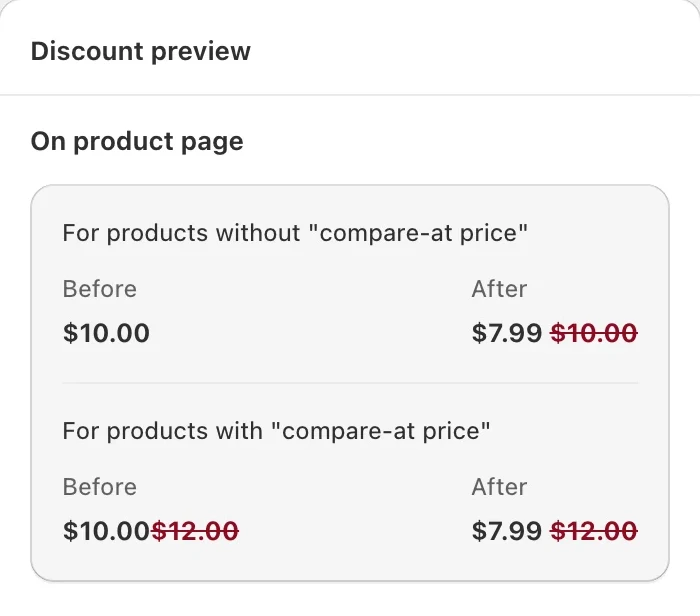
- Compare-at prices. Set a compare-at price so the original and the sale price both show on the product page and in your product feed.
- Automatic discounts. Someone arriving from an ad has no code. An automatic discount applies in the cart by itself, so the price matches the ad without a code box in the way.
Schedule both to start and end on the sale's dates, and check them on a test order before you turn on the ads.
Set up tracking and the product feed with Orichi
Without tracking, you cannot tell whether ChatGPT Ads made you money. Set it up in early November, so it has time to collect data before traffic rises. With Orichi ChatGPT Ads (Built for Shopify, 5.0 stars from 30 reviews on the Shopify App Store on October 28, 2026):
- Install the OpenAI Ads pixel in one click, with no theme code.
- Turn on the Conversions API (CAPI). Purchase events are sent from the server too, so sales are not lost to ad blockers. Browser and server events are deduplicated, so nothing is counted twice.
- Place a test order and confirm the purchase event shows up.
- Sync your product feed so sale prices and stock follow your discounts. Remove products that will sell out early or are not in the sale, and write clear titles: "Men's Merino Wool Sweater, Navy" beats "Classic Knit 02".
Orichi's free plan covers the pixel and CAPI, but counts 10 order events a month and syncs the feed weekly. For a sale week you want the Grow plan ($9.99 a month, unlimited order events, daily feed sync and the ROAS report) or Scale ($19.99 a month, real-time feed sync). Prices are as listed on October 28, 2026. The full steps are in Orichi's guide, How to set up the ChatGPT (OpenAI Ads) pixel on your Shopify store.
Plan the campaign in four phases
| Phase | Dates (2026) | Goal | Offer that fits |
|---|---|---|---|
| Warm-up | Nov 2 to 15 | Build interest, collect data | No discount yet: small budget, gift guides, early-access signup |
| Early access | Nov 16 to 26 | Reward early buyers | A smaller early deal for subscribers; retarget site visitors |
| Black Friday to Cyber Monday | Nov 27 to 30 | Sell | Full budget, your strongest offer, best-selling products |
| Extended sale | Dec 1 to 7 | Catch late shoppers | "Last chance" offer with your shipping cutoff dates |
Use Orichi Audiences to retarget shoppers who viewed products or added to cart during the warm-up. They are the most likely to buy when the sale opens.
Measure profit after the discount
Open the ROAS report in Orichi every day of the sale and check:
- ROAS by day. Raise the budget on profitable days and pull back on the others.
- Top products. Move budget toward what is selling.
- Reported against actual orders. Compare the report's conversions with your Shopify orders, to confirm the numbers hold up.
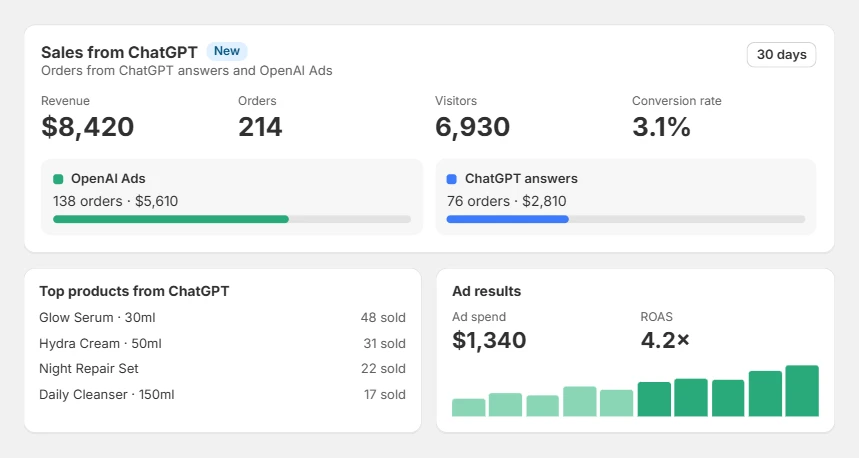
Read the report against revenue after the discount. A 3x ROAS on full-price revenue is a different result when every order carried 25% off. Work out your cost per order after the discount and compare it with your other channels. If ChatGPT Ads wins on that number, keep it running into the holiday season. If not, you have spent a capped test budget to find out.
Where it breaks, and how to undo it
- Review takes time. Ads run only after they pass review, and a new account may advertise only in its home country at first. Open the account in early November, not in sale week.
- The ad and the store disagree on price. If the feed still carries last week's price, the shopper lands on a different number than the ad showed. Sync the feed after the discounts go live, and check one product end to end.
- The free plan runs out. Ten order events a month is enough to test the pixel, not to measure a sale week.
- Undoing it. Pause the campaign in OpenAI Ads Manager to stop spend at once. Your discounts end on the dates you scheduled, and the pixel can stay installed for the next test.
Black Friday ChatGPT Ads checklist
- Pixel and CAPI live by early November
- Test purchase confirmed
- Compare-at prices and automatic discounts scheduled for the sale dates
- Product feed synced, sale prices correct, non-sale products removed
- Warm-up audiences building
- Ads written around the offer and the gift question
- Daily budget plan for Nov 27 to 30
- ROAS report checked every day, against revenue after the discount
FAQ
When should I start ChatGPT Ads for Black Friday?
Set up tracking in early November and start a small warm-up campaign two to three weeks before November 27. Leave time for the ads to pass review.
Do I need a product feed?
Yes, for product ads. Orichi keeps it synced; on the Grow plan and up it syncs daily, so sale prices update in time.
How much should I spend?
Start with a small share of your BFCM ad budget; OpenAI's minimum is $25 a day. Scale only after the ROAS report shows profitable days.
Is there a free ChatGPT Ads app for Shopify?
Orichi ChatGPT Ads has a free plan that covers pixel and CAPI setup, with 10 order events a month. Install Orichi ChatGPT Ads on the Shopify App Store.
 Black Friday Discount Percentage: What Stores Actually Run
 What Is a Tiered Discount? Set Up Tiered Pricing on Shopify
 Shopify Black Friday Strategies: 12 Moves and Their Settings