Shopify Black Friday Strategies: 12 Moves and Their Settings
Marketing and Discount

Shopify Black Friday Strategies: 12 Moves and Their Settings

Mahbod Mortazavi, Marketing Director at Discounty
Mahbod Mortazavi
|
October 13, 2026

In short

  • Black Friday stands apart when it is the lowest price of the year on the products in it, and it really ends. So those products get no public discount before it.
  • Pick one main offer in the shape that fits your store, and set its depth from your margin. Your list gets the same offer 48 hours early.
  • Cyber Monday is the last day, never a deeper one. Prices go back at 23:59 on Monday, and the next offer is private, smaller and in January.

Black Friday works when shoppers believe it. That takes the lowest price of the year on the products in the sale, an opening date you announced, and an end that really happens. Every move below protects one of the three.

If you discount the same products in early November and again in December, what is left for Friday? Shoppers learn the pattern and wait. So this plan keeps those products at full price until the sale, lets your list in 48 hours early at the same price, and ends on Monday at 23:59.

The week is worth the care. Across Discounty stores, campaigns started in November 2025 brought 4.6× the orders of a typical month.

What happens2026 date
Sale products held at full priceFrom Tuesday 27 October
Starts-in countdown on the sale productsMonday 23 November
Early access for your listTuesday 24 and Wednesday 25 November
Public sale opens, on ThanksgivingThursday 26 November, 00:00
Black FridayFriday 27 November
Cyber Monday, the last dayMonday 30 November, prices back at 23:59
Free shipping above your average orderMonday 30 November to Thursday 17 December, the USPS Ground Advantage cutoff
Private code for new customersMonday 4 to Sunday 24 January

Each move gives the reason, the settings by the names you will see in Discounty, a worked example and the catch. Times are in your store's time zone.

1. Decide what makes your Black Friday distinct

If shoppers can get your Black Friday price in early November or in December, Friday is one more sale day. Frequent discounts lower the price customers expect to pay, and they teach people to wait (Kalwani and Yim, Journal of Marketing Research, 1992). Sales dip before a promotion people know is coming, and again after it (van Heerde, Leeflang and Wittink, 2000).

The UK consumer group Which? tracked 175 Black Friday deals at eight big retailers for a year and found 83% of them at the same price or lower on other days (November 2025). That is how a sale loses its credibility.

So decide three things before you build anything. The products in the sale get no public discount before it. The sale price is the lowest those products have had all year. And the sale has an end you keep.

  1. List the products you plan to put in the sale.
  2. In Discounty, find every Active or Scheduled campaign that touches those products before Thursday 26 November.
  3. Click Deactivate on any that would discount them from Tuesday 27 October on.
  4. Note the lowest price each product has had this year. Your Black Friday price has to go below it.
  5. Fix the end now: Monday 30 November, 23:59.

Example. Take a $50 serum. Say you run 15% off it on 10 November, so it sells at $42.50, and your Black Friday price is 20% off, or $40. The shopper who bought on the 10th learns that waiting would have saved $2.50. For a shopper in the EU, the law counts your discount from the lowest price of the previous 30 days, which is $42.50. Your 20% becomes $2.50 off $42.50, about 6%. Without the November sale, the same $40 is a clean 20% off everywhere.

The catch. Holding the price costs you some early sales. The National Retail Federation found 84% of US shoppers had started their holiday buying by the end of Thanksgiving weekend 2025, and some will not wait. Reach them with the announcement in move 5 and early access in move 6. If you want a reason to buy earlier, offer something that leaves the price alone, such as a gift above a basket value.

2. Choose the offer shape for your store type

In a BCG survey of more than 10,000 shoppers in ten countries (September 2025), about 60% preferred a plain percentage off everything. So any other shape has to earn its place by changing what goes in the basket. Last Black Friday week, orders under Quantity discount campaigns in Discounty carried a median of 3 items. Cart goal orders carried 2.8, and Bulk price editor orders 1.3. Stores chose those types for their own reasons, so this shows what happened without proving cause.

Pick one main offer. In a 2023 BCG survey, more than 70% of shoppers preferred one clear discount to several stacked together.

Your storeMain offerCampaign type
Consumables and repeat buys: coffee, supplements, pet food, basics2 items 10% off, 3 or more 15% offQuantity discount
Many products per order: apparel, beauty, homeA first step about one item above your average order, a second about two items aboveCart goal
A brand that does not cut pricesA gift on orders about one item above your average orderBuy X get Y
One expensive item per order: furniture, electronicsA moderate cut, or an accessory as a giftBulk price editor or Buy X get Y
High margin across a wide catalogueOne percentage across the store or a collectionBulk price editor
  1. For tiers, create a Quantity discount or Cart goal and choose Mix of products under Discount conditions.
  2. Pick Percentage, set the lower step, then click Add discount tier for the second. Stop at two.
  3. For a gift, create a Buy X get Y, set Discount condition to Minimum spend amount, and choose Free gift as the reward.
  4. Write the Discount label shown at checkout so it names the offer, such as "Black Friday: 15% off".
  5. In the live preview, test one, two and three items before you save.

Example. A coffee roaster sells bags at $18. One bag costs $18, two cost $32.40 at 10% off, and three cost $45.90 at 15% off. A store-wide 20% would hand $3.60 to everyone who came for one bag anyway. The tiers spend that money on the second and third bag.

The catch. Tiers grow the baskets of customers you already have. Steven Levitt and colleagues tested quantity discounts on more than 14 million players of a game selling virtual goods (2016). The discounts changed what existing buyers took and brought in almost no new ones. Quantity discount and Cart goal also never combine with each other, so pick one. And the top tier applies to every item in the basket, so that is the step to price against your margin in move 3.

A Quantity discount or Cart goal with more than one tier is on the Essential plan and up. Buy X get Y starts on the Lite plan.

3. Set the depth from your margin

Depth is where most stores copy each other. Across Discounty stores, the median discount in Black Friday week 2025 was 20%, the same as an ordinary week. That tells you what is common. Your margin tells you what you can afford.

Demand does not climb in a straight line with the discount. Below some depth, a discount changes few decisions. Above another, going deeper adds little. In between, every point you give away has to come back as extra orders. To find how many, divide the discount by what is left of your margin after it. At a 50% margin and 20% off, that is 20 ÷ 30, or 67% more sales.

Gross margin10% off20% off30% off
40%33% more sales100% more300% more
50%25% more67% more150% more
60%20% more50% more100% more
70%17% more40% more75% more
  1. Work out the gross margin on the sale products: price minus cost, divided by price.
  2. Work out how many extra orders that depth needs before it makes money. How much to discount on Black Friday shows how.
  3. Ask whether that many extra orders can really come. If not, go shallower or change the shape.
  4. For tiers, run the sum on the top tier, since it applies to every item.
  5. In the Bulk price editor campaign, choose Percentage, Fixed amount or New price and enter the depth.
  6. Check the Summary panel before you save.

Example. A $40 product costs you $20, a 50% margin. At 20% off it sells for $32 and earns $12 instead of $20. Ten orders used to earn you $200. To earn the same $200 at $12 each, you need about 17 orders, 67% more. At 30% off each order earns $8, and you need 25.

The catch. The sum covers gross margin and nothing else. US retailers expect about 17% of holiday sales to come back as returns (NRF and Happy Returns, October 2025), and every return takes back a discounted sale, so judge the weekend on profit after returns. A deeper Friday also sets the floor that every later offer on those products has to stay above.

4. Decide which products are in and out

A sale sign loses its pull when it hangs on everything. In Anderson and Simester's study of a catalogue retailer, a category sold more when some of its items carried a sale sign than when all of them did (Marketing Science, 2001). So choose. Put in the products shoppers wait all year to buy from you. Keep out new arrivals, bestsellers that sell at full price anyway, and anything whose margin cannot carry the depth from move 3.

Choosing too few has a cost of its own. We took the Discounty stores that ran both a narrow campaign (20 products or fewer) and a broad one (more than 20) in Black Friday week 2025, so each store is compared with itself. A broad campaign brought in orders 72% of the time, against 57% for a narrow one. Stores pick their own scope, and a narrow campaign is often a test, so this shows what happened without proving cause.

It helps to sort the catalogue into three groups:

  • Products that sell at full price. They sell this week without help, so a discount spends margin on orders you already had.
  • Products just outside that list. Wanted, but not quite at full price. This is where a Black Friday is usually won, because the discount changes a decision.
  • Products that never move. Price is rarely why they sit. Put them behind something popular with a tier, a threshold or a gift, rather than marking them down on their own.

Check the compare-at price too. When a product already has one, a Bulk price editor sale keeps it as the struck price. A compare-at left from an old markdown then shows a bigger drop than the one you are giving. And leave compare-at prices alone in the weeks before. In the US, the UK and the EU alike, a "was" price has to be one the product really sold at recently.

  1. Create the Bulk price editor campaign and pick products by Collections, Product tags, Vendors, Product types or All store.
  2. Tick Excludes and add new arrivals, full-price bestsellers and low-margin items.
  3. Click Calculate items count and check the variant total against your plan.
  4. In Shopify, find any sale product still marked down by hand, and set its price back to the compare-at price.

Example. Your store has 60 products. You keep out 8 new arrivals and 4 bestsellers, so 48 go in. At 3 sizes and 2 colours each, that is 48 × 6 = 288 variants for your plan to cover. One of the 48, a $50 shirt, still carries a $70 compare-at from a summer markdown. At 20% off it sells for $40 under a struck $70. That reads as 43% off a shirt that cost $50 last week.

The catch. A product held by another active campaign drops out of the new one, and the storefront gives no sign of it. The Products already discounted window shows which campaign is holding it, so check before Thursday. Fix the list before the sale opens, too: an active campaign cannot be edited.

Excluding products needs the Lite plan or higher.

5. Announce it without discounting

Before the day, a reminder does the selling. In field tests on emailed discount codes, Sahni, Zou and Chintagunta found most of the extra sales came from people who never used the code (Management Science, 2017). Hearing about the offer was enough. So tell shoppers the sale is coming, and leave the price alone until it starts. Your emails can carry the date. On the store, a countdown does it.

Keep the countdown short. A shopper who knows a sale is near holds off buying, and a countdown that runs for weeks stretches that pause. Show it from Monday 23 November, three days out. Build the campaign well before then. Two thirds of last season's campaigns in Discounty were created on the day they went live.

  1. Create the main sale campaign now and set Start date to Thursday 26 November and Start time to 00:00.
  2. Tick Set end date and enter Monday 30 November, 23:59.
  3. Save. The campaign shows as Scheduled, and no price changes yet.
  4. On Monday 23 November, open the campaign and turn on the Start in countdown for product pages.
  5. In Customization, open Starts in countdown timer, switch it on for your store, and set the title to "Black Friday starts in".

The countdown timer is on the Essential plan and up.

Example. Your $40 candle still sells for $40 on Monday, with the countdown on its product page. Switch the countdown on at 09:00 on Monday and it reads 2 days 15 hours. At 00:00 on Thursday the price drops to $32 with $40 struck through, and nobody has to be awake for it.

The catch. The Start in countdown counts from the moment you switch it on. Turn it on the day you build the campaign and it runs for weeks. The date it counts to also has to be real. A countdown that resets, or a sale that carries on after it reaches zero, is what regulators in the US and the UK call a fake deadline.

6. Give your list early access: the same offer, 48 hours

Early access is a head start, so the price should match the public one. Eric Anderson and Duncan Simester ran a 28-month field test with more than 50,000 customers of a US catalogue retailer. Those who saw an item cheaper after buying it ordered about 15% less afterwards (Quarterly Journal of Economics, 2010). The effect was strongest among the customers who spent the most. A deeper offer for the list is no fix either. In three more field tests by the same researchers, deeper discounts lowered the later buying of established customers (Marketing Science, 2004), who make up much of a typical list.

The reward is time: the pick of sizes, colours and stock before the crowd. Codes tend to get used at the start of a window and again just before it closes, so a short window with a clear end catches both. Run it on Tuesday 24 and Wednesday 25 November, and close it as the public sale opens.

  1. Create an Advanced discount code and type a code such as EARLY20, or use Generate random code.
  2. Turn on Product discount, set Applies to the same collection as your public sale, and enter the same percentage.
  3. Under Maximum discount uses, tick Limit to one use per customer.
  4. Under Customer selection, choose Specific customer segments and pick your email subscribers.
  5. In Schedule, start on Tuesday 24 November at 00:00, tick Set end date, and end on Wednesday 25 November at 23:59.

Example. Your public sale is 20% off from Thursday. A subscriber who buys a $60 jacket with EARLY20 on Tuesday pays $48, what a stranger pays on Thursday. Give the list 10% instead and they pay $54 on Tuesday, $6 more than someone who waited.

The catch. Let the code run into Thursday and it stacks on the sale price: 20% off $48 is $38.40, or 36% off in total. End it at 23:59 on Wednesday. A segment also checks the shopper's email at checkout. Your subscribers have to exist as customers in Shopify with email marketing accepted, so a list kept in your email tool alone will not qualify. The full setup is in Black Friday early access.

Advanced discount code needs the Essential plan or higher. Limiting a code to customer segments needs the Discounty plan or higher. On a lower plan, send the code to your list and keep one use per customer.

7. Show the offer next to the price

A shopper deciding between tabs reads the product page and the cart. In Baymard Institute's usability tests, 64% of shoppers looked for the shipping cost on the product page itself. If the tier, the threshold or the deadline is missing there, it does not exist for them. Last season, 16% of campaigns in Discounty showed an end countdown.

  1. In Shopify, go to Online Store, Themes, Customize, then App embeds. Switch the Discounty embed on and save.
  2. In Discounty Customization, switch on what your offer needs: Quantity/Value table, Shipping progress bar, Buy X get Y-pop-up or Saving on cart.
  3. In the main sale campaign, turn on the Ends in countdown for product pages before Thursday.
  4. A Bulk price editor sale needs nothing extra. It changes the price, and most themes strike through the old one.
  5. Open one sale product signed out, on a phone, and pick a variant. Check the price, the struck price and each element.

Example. A $60 jacket in a 20% sale shows $48 with $60 struck through. Put two in the cart and Saving on cart reads Total $120, Saving $24, Subtotal $96.

The catch. Nothing shows until the app embed is on in your published theme. One homepage countdown runs at a time, and Saving on cart shows the total saving without a line per product. In checkouts inside AI assistants the discount still applies, but none of these elements appears.

Styling these elements to match your theme needs the Lite plan or higher.

8. Decide what stacks

From Thursday, a shopper can arrive with an old welcome code while the sale price is live and a threshold is on. Whether they all apply is your decision. Last season, 2.7% of campaigns in Discounty were set to combine with other discounts, and the rest kept the default. Shoppers also prefer one clear discount to several stacked ones, so stacking rarely buys you much.

  1. List every offer live from Thursday, including Shopify's own codes and other apps.
  2. Know the fixed rules: Quantity discount and Cart goal never combine, and no order takes two shipping discounts.
  3. To run a tier on top of the sale price, allow it under Campaign combinations in the Bulk price editor campaign.
  4. In each Advanced discount code, set Combinations for its product, order and shipping discounts.
  5. Count your automatic discounts. Shopify allows 25 active at once, app discounts included.
  6. On Wednesday, place one test order that tries every offer together.
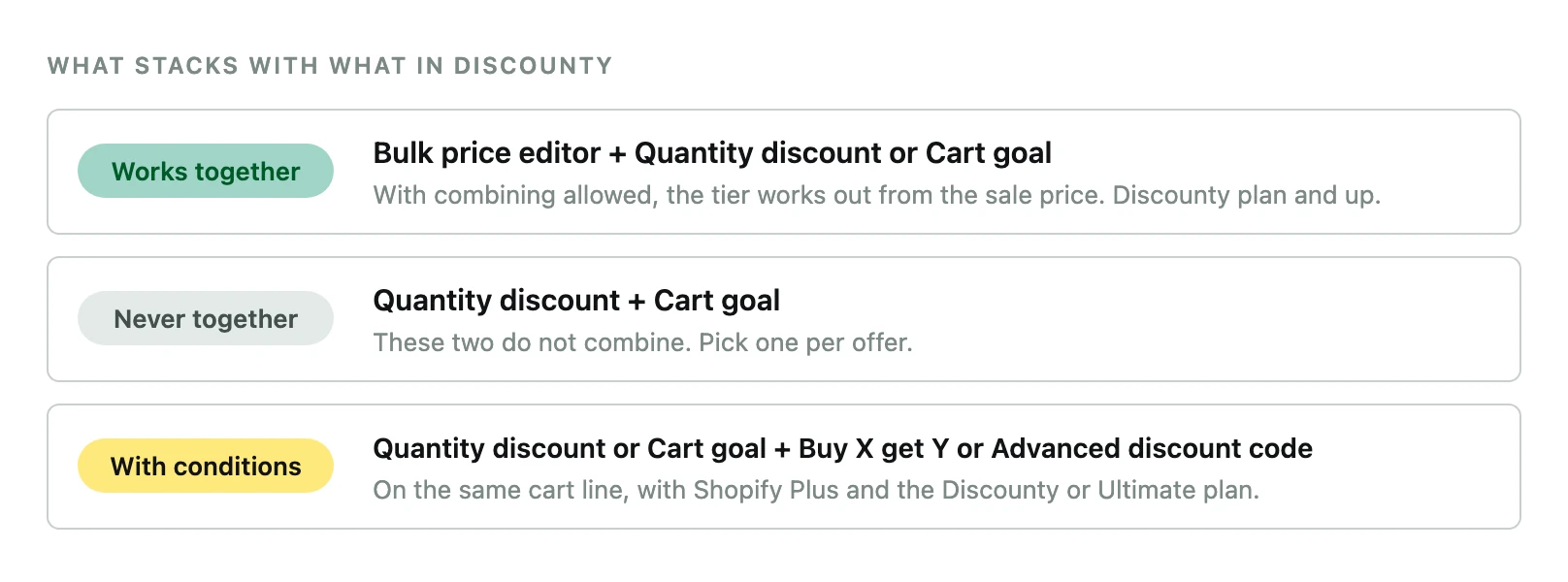
What stacks in Discounty: three rules, shown as works together, never together and with conditions.

Example. A $100 cart in a 20% sale comes to $80. If a 10% email code may combine, it takes 10% of $80 and the shopper pays $72. That is 28% off in total, deeper than either offer you planned.

The catch. The settings for combining discounts cannot keep a code off a Bulk price editor sale. The sale is the product's price, so any code a shopper holds applies on top of it. To keep a code off sale items, limit the code to products outside the sale. The rules are in what stacks on Shopify.

Letting Discounty campaigns combine with each other needs the Discounty plan or higher. Stacking a Quantity discount or Cart goal with Buy X get Y or an Advanced discount code on the same cart line also needs Shopify Plus.

9. Offer free shipping above your average order

In Baymard Institute's research, extra costs such as shipping are the most common reason shoppers give for leaving a checkout. Free shipping for everyone fixes that, and often loses money. In one online retailer's data, Lewis, Singh and Fay found free shipping raised orders, with or without a minimum, but the shipping income given up was larger than the profit added (Marketing Science, 2006). Shehu, Papies and Neslin found it pushed shoppers toward riskier items and raised returns (Journal of Marketing Research, 2020).

A minimum set above the average order did better. Chen and Ngwe studied more than two million orders at the fashion retailer Zalora (Harvard Business School working paper, 2018). A minimum brought slightly fewer orders, larger baskets and more profit than free shipping for all. The minimum is what makes the difference. Set it where the extra spend pays the shipping: your average order plus your shipping cost divided by your margin. A shipping progress bar shows the shopper the gap.

Run it from Monday 30 November to your carrier's last day for Christmas delivery. For USPS Ground Advantage in 2026, that is Thursday 17 December. It gives Cyber Monday a new reason to buy, and it carries December without touching your sale price.

  1. Create a Shipping discount, choose Automatic discount, then Free shipping.
  2. Set Minimum order amount to your average order over the last 90 days plus your shipping cost divided by your margin.
  3. Turn on the progress bar for this campaign.
  4. In Customization, open Shipping progress bar and choose Product page, Cart page or both.
  5. Under combinations, tick Product discounts and Order discounts so it applies alongside your sale.
  6. In Schedule, start on Monday 30 November at 00:00 and end on your carrier's last shipping day.

Example. Say your average order is $62, a parcel costs you $8 to ship, and your margin is 40%. On a $25 order, $8 eats 80% of the $10 you earn. On a $70 order it eats 29% of the $28. Set the threshold at $85, because $62 plus $8 divided by 0.40 is $82. A shopper at $62 sees "You're $23 away from free shipping" and adds a $25 item, for $87. At a 40% margin that item earns $10, which pays the $8 parcel. Set it at $70 and the extra $8 of spend earns $3.20 against the same $8.

The catch. No order takes two shipping discounts, so this replaces any other shipping offer in the cart. The progress bar runs on one automatic campaign at a time. Free shipping with no minimum makes sense when shipping costs well under a tenth of your average order, or is already in your prices. After the last shipping day, point shoppers to gift cards, which still arrive in time.

Shipping discount starts on the Lite plan.

10. Make Cyber Monday the last day

Cyber Monday is the biggest online day of the season, so it is tempting to cut deeper. Hold the price. A shopper who bought on Friday and sees a lower price on Monday orders less from you afterwards, and can return the item and buy it again. Adobe's 2026 forecast also expects the deepest Cyber Monday prices in electronics and computers. Apparel, toys, TVs, appliances and furniture see theirs on Black Friday.

So present Monday as the last day of Friday's price, with an ends-in countdown. For a new reason to buy, add one that leaves the price alone. Free shipping above your average order from move 9 works, and so does a gift above a basket value.

  1. Leave the main sale's end date at Monday 30 November, 23:59. Build no deeper Monday campaign.
  2. Before Thursday, turn on the Ends in countdown for the homepage in the main sale campaign.
  3. In Customization, open Ends in countdown timer and set the title to "Last day: Black Friday prices end in".
  4. Let the free shipping campaign from move 9 start on Monday at 00:00.
  5. If you already offer free shipping above a threshold all year, run a Buy X get Y gift with Minimum spend amount on Monday instead.

Example. A $60 jacket sold for $48 on Friday. Cut Monday to 30% and it sells for $42, so every Friday buyer paid $6 more for buying sooner. Keep Monday at $48 and add free shipping over $70 instead. A shopper who adds a $24 hat to the jacket reaches $72 and ships free.

The catch. Set Monday up before Thursday. Once the sale is live you can change its end time, and nothing else. One homepage countdown runs at a time, too, so switching one on in a new Monday campaign turns off the sale's. More extras that keep the price are in Cyber Monday offer ideas.

11. End on time and check prices went back

Last season, 11% of campaigns in Discounty had no end date at all. A sale that drifts into December tells everyone who bought on Friday that the deadline was never real, and the countdown you showed becomes a fake one. If you want a longer sale, announce the extra days before Thursday. Never add them as a surprise on Tuesday.

  1. Check every campaign has Set end date ticked, with the main sale ending Monday 30 November, 23:59.
  2. Leave the end time alone. An active campaign's end time is the one setting you can still change, and it is the one to resist.
  3. On Tuesday 1 December, check each campaign shows Expired. A large sale passes through Reverting on the way.
  4. Open five sale products, signed out, and check the price and the compare-at price are back.
  5. Never uninstall Discounty or edit sale prices by hand while a Bulk price editor campaign is active or reverting.

Example. Say the sale brings 40 orders a day at an average of $60, at 20% off. Two extra days give away $12 on each of 80 orders. That is $960 you did not plan to give, and a lesson for Friday's buyers that waiting costs nothing.

The catch. If you uninstall the app while a Bulk price editor campaign is running, prices stay at the sale level and your theme keeps the sale badge. Deactivate the campaign, wait for Expired, then uninstall if you want to.

12. After the sale: a private second order, and clearance kept apart

Customers won with a deep discount come back less on their own. Datta, Foubert and Van Heerde studied customers won with a free trial. They were worth less, but they answered follow-up marketing better than others (Journal of Marketing Research, 2015). So ask them back privately, with less than Black Friday gave them. Smaller keeps them from waiting for the next sale, and private keeps your public price whole.

Send it in January. No study compares the two months, so this is a judgement. In December your buyers are still buying gifts, and a code mostly discounts orders they would place anyway. In December, say thank you without a code.

Keep clearance after Christmas to stock that was not in the Black Friday sale. Returns pile up in the last week of December, and a Black Friday product that gets cheaper then can be returned and bought again. In the EU, the lowest price of the previous 30 days holds until 30 December, so a percentage on those products counts from the Black Friday price.

  1. In Shopify, go to Customers, Segments, Create segment, and build one for customers whose one order came in Black Friday week.
  2. Create an Advanced discount code with Order discount at 10%, or Shipping discount set to Free shipping.
  3. Under Customer selection, choose Specific customer segments and pick that segment.
  4. Under Maximum discount uses, tick Limit to one use per customer.
  5. In Schedule, run it from Monday 4 January to Sunday 24 January, 23:59.
  6. For clearance, create a Bulk price editor campaign on seasonal stock, and tick Excludes for every product that was in the Black Friday sale.

Example. Say 150 new customers bought in Black Friday week. If 1 in 10 uses a 10% code on a $60 order, that is 15 orders and $900 of sales for $90 of discount. For clearance, take a sweater that was $80, and $64 on Black Friday. Put it in a 30% clearance on 26 December at $56, and Friday's buyer can return it and rebuy for $8 less. For an EU shopper the drop counts from $64, which makes it 12.5%.

The catch. A Discounty code looks at the current cart and nothing else, so it cannot check what someone bought before. The segment does that work, so build it in Shopify from order history. The full sequence is in after Black Friday.

Advanced discount code needs the Essential plan or higher, and customer segments need the Discounty plan or higher. On a lower plan, send the code to those buyers and keep one use per customer.

What goes wrong

Black Friday trouble comes from a short list. Prices do not come back, codes stack further than planned, and offers sit where nobody sees them. The variant count outgrows the plan, and the sale never quite ends. Each one, with how to catch it early, is in what goes wrong at Black Friday.

For the order to do things in, use the Black Friday checklist.

How we counted

Our own figures are counted across Discounty campaigns on Shopify stores in Black Friday season 2025, read from our own records in September and October 2026. Every one is a share, a median or a multiple across stores, and no single store can be identified from it. The research we cite is named where it appears. The settings are the names you see in Discounty today.

Questions

If I discount before and after Black Friday, what makes Black Friday different?

Very little, and shoppers notice. Keep the sale products at full price from late October, and give your list the same offer 48 hours early. Make Friday the lowest price of the year on those products, then end it on Monday at 23:59.

When should a Shopify Black Friday sale start in 2026?

Open the public sale on Thanksgiving, Thursday 26 November, at 00:00 store time. End it on Cyber Monday, 30 November, at 23:59. Your list gets the same offer on Tuesday 24 and Wednesday 25 November, and the starts-in countdown runs from Monday 23 November.

How much should I discount for Black Friday?

Start from your margin. Across Discounty stores, the median Black Friday week discount in 2025 was 20%, the same as an ordinary week. Work out how many extra orders your depth needs before it pays. How much to discount on Black Friday shows how, with the full spread.

How many products should a Black Friday sale cover?

More than twenty, unless you have a reason for a narrow one. Among stores that ran both kinds in Black Friday week 2025, a broad campaign brought in orders 72% of the time, against 57% for a narrow one.

What is a good Black Friday strategy for a small store?

Pick one offer shape rather than several. A small catalogue usually does better with a tier or a gift above a basket value than with a store-wide percentage that competes with larger stores on depth.

Is a percentage or a fixed amount better for Black Friday?

Neither in general. A percentage reads clearly across a wide catalogue. A fixed amount reads more strongly on a narrow one, where shoppers know the usual price.

Should Cyber Monday be deeper than Black Friday?

No. Anyone who bought on Friday would have paid more for buying sooner. Make Monday the last day at Friday's price, and add a reason that leaves the price alone, such as free shipping above your average order.

Is free shipping with no minimum a good Cyber Monday offer?

For most stores, no. The cost lands on the smallest orders, and in a study of one online retailer, Lewis, Singh and Fay found free shipping for all lifted orders. It still lost more in shipping revenue than the extra sales earned (Marketing Science, 2006). Set the minimum where the extra spend pays the shipping: your average order plus your shipping cost divided by your margin. No minimum works when shipping costs well under a tenth of your average order.

Should subscribers get a bigger discount for early access?

Give them the same offer as the public sale, 48 hours sooner. A smaller one means they pay more than people who waited. A deeper one teaches your most loyal customers to hold out for it.

Shopify Black Friday Strategies: 12 Moves and Their Settings

Mahbod Mortazavi, Marketing Director at Discounty
Mahbod Mortazavi
|
October 13, 2026
Shopify Black Friday Strategies: 12 Moves and Their Settings
Marketing and Discount

In short

  • Black Friday stands apart when it is the lowest price of the year on the products in it, and it really ends. So those products get no public discount before it.
  • Pick one main offer in the shape that fits your store, and set its depth from your margin. Your list gets the same offer 48 hours early.
  • Cyber Monday is the last day, never a deeper one. Prices go back at 23:59 on Monday, and the next offer is private, smaller and in January.

Black Friday works when shoppers believe it. That takes the lowest price of the year on the products in the sale, an opening date you announced, and an end that really happens. Every move below protects one of the three.

If you discount the same products in early November and again in December, what is left for Friday? Shoppers learn the pattern and wait. So this plan keeps those products at full price until the sale, lets your list in 48 hours early at the same price, and ends on Monday at 23:59.

The week is worth the care. Across Discounty stores, campaigns started in November 2025 brought 4.6× the orders of a typical month.

What happens2026 date
Sale products held at full priceFrom Tuesday 27 October
Starts-in countdown on the sale productsMonday 23 November
Early access for your listTuesday 24 and Wednesday 25 November
Public sale opens, on ThanksgivingThursday 26 November, 00:00
Black FridayFriday 27 November
Cyber Monday, the last dayMonday 30 November, prices back at 23:59
Free shipping above your average orderMonday 30 November to Thursday 17 December, the USPS Ground Advantage cutoff
Private code for new customersMonday 4 to Sunday 24 January

Each move gives the reason, the settings by the names you will see in Discounty, a worked example and the catch. Times are in your store's time zone.

1. Decide what makes your Black Friday distinct

If shoppers can get your Black Friday price in early November or in December, Friday is one more sale day. Frequent discounts lower the price customers expect to pay, and they teach people to wait (Kalwani and Yim, Journal of Marketing Research, 1992). Sales dip before a promotion people know is coming, and again after it (van Heerde, Leeflang and Wittink, 2000).

The UK consumer group Which? tracked 175 Black Friday deals at eight big retailers for a year and found 83% of them at the same price or lower on other days (November 2025). That is how a sale loses its credibility.

So decide three things before you build anything. The products in the sale get no public discount before it. The sale price is the lowest those products have had all year. And the sale has an end you keep.

  1. List the products you plan to put in the sale.
  2. In Discounty, find every Active or Scheduled campaign that touches those products before Thursday 26 November.
  3. Click Deactivate on any that would discount them from Tuesday 27 October on.
  4. Note the lowest price each product has had this year. Your Black Friday price has to go below it.
  5. Fix the end now: Monday 30 November, 23:59.

Example. Take a $50 serum. Say you run 15% off it on 10 November, so it sells at $42.50, and your Black Friday price is 20% off, or $40. The shopper who bought on the 10th learns that waiting would have saved $2.50. For a shopper in the EU, the law counts your discount from the lowest price of the previous 30 days, which is $42.50. Your 20% becomes $2.50 off $42.50, about 6%. Without the November sale, the same $40 is a clean 20% off everywhere.

The catch. Holding the price costs you some early sales. The National Retail Federation found 84% of US shoppers had started their holiday buying by the end of Thanksgiving weekend 2025, and some will not wait. Reach them with the announcement in move 5 and early access in move 6. If you want a reason to buy earlier, offer something that leaves the price alone, such as a gift above a basket value.

2. Choose the offer shape for your store type

In a BCG survey of more than 10,000 shoppers in ten countries (September 2025), about 60% preferred a plain percentage off everything. So any other shape has to earn its place by changing what goes in the basket. Last Black Friday week, orders under Quantity discount campaigns in Discounty carried a median of 3 items. Cart goal orders carried 2.8, and Bulk price editor orders 1.3. Stores chose those types for their own reasons, so this shows what happened without proving cause.

Pick one main offer. In a 2023 BCG survey, more than 70% of shoppers preferred one clear discount to several stacked together.

Your storeMain offerCampaign type
Consumables and repeat buys: coffee, supplements, pet food, basics2 items 10% off, 3 or more 15% offQuantity discount
Many products per order: apparel, beauty, homeA first step about one item above your average order, a second about two items aboveCart goal
A brand that does not cut pricesA gift on orders about one item above your average orderBuy X get Y
One expensive item per order: furniture, electronicsA moderate cut, or an accessory as a giftBulk price editor or Buy X get Y
High margin across a wide catalogueOne percentage across the store or a collectionBulk price editor
  1. For tiers, create a Quantity discount or Cart goal and choose Mix of products under Discount conditions.
  2. Pick Percentage, set the lower step, then click Add discount tier for the second. Stop at two.
  3. For a gift, create a Buy X get Y, set Discount condition to Minimum spend amount, and choose Free gift as the reward.
  4. Write the Discount label shown at checkout so it names the offer, such as "Black Friday: 15% off".
  5. In the live preview, test one, two and three items before you save.

Example. A coffee roaster sells bags at $18. One bag costs $18, two cost $32.40 at 10% off, and three cost $45.90 at 15% off. A store-wide 20% would hand $3.60 to everyone who came for one bag anyway. The tiers spend that money on the second and third bag.

The catch. Tiers grow the baskets of customers you already have. Steven Levitt and colleagues tested quantity discounts on more than 14 million players of a game selling virtual goods (2016). The discounts changed what existing buyers took and brought in almost no new ones. Quantity discount and Cart goal also never combine with each other, so pick one. And the top tier applies to every item in the basket, so that is the step to price against your margin in move 3.

A Quantity discount or Cart goal with more than one tier is on the Essential plan and up. Buy X get Y starts on the Lite plan.

3. Set the depth from your margin

Depth is where most stores copy each other. Across Discounty stores, the median discount in Black Friday week 2025 was 20%, the same as an ordinary week. That tells you what is common. Your margin tells you what you can afford.

Demand does not climb in a straight line with the discount. Below some depth, a discount changes few decisions. Above another, going deeper adds little. In between, every point you give away has to come back as extra orders. To find how many, divide the discount by what is left of your margin after it. At a 50% margin and 20% off, that is 20 ÷ 30, or 67% more sales.

Gross margin10% off20% off30% off
40%33% more sales100% more300% more
50%25% more67% more150% more
60%20% more50% more100% more
70%17% more40% more75% more
  1. Work out the gross margin on the sale products: price minus cost, divided by price.
  2. Work out how many extra orders that depth needs before it makes money. How much to discount on Black Friday shows how.
  3. Ask whether that many extra orders can really come. If not, go shallower or change the shape.
  4. For tiers, run the sum on the top tier, since it applies to every item.
  5. In the Bulk price editor campaign, choose Percentage, Fixed amount or New price and enter the depth.
  6. Check the Summary panel before you save.

Example. A $40 product costs you $20, a 50% margin. At 20% off it sells for $32 and earns $12 instead of $20. Ten orders used to earn you $200. To earn the same $200 at $12 each, you need about 17 orders, 67% more. At 30% off each order earns $8, and you need 25.

The catch. The sum covers gross margin and nothing else. US retailers expect about 17% of holiday sales to come back as returns (NRF and Happy Returns, October 2025), and every return takes back a discounted sale, so judge the weekend on profit after returns. A deeper Friday also sets the floor that every later offer on those products has to stay above.

4. Decide which products are in and out

A sale sign loses its pull when it hangs on everything. In Anderson and Simester's study of a catalogue retailer, a category sold more when some of its items carried a sale sign than when all of them did (Marketing Science, 2001). So choose. Put in the products shoppers wait all year to buy from you. Keep out new arrivals, bestsellers that sell at full price anyway, and anything whose margin cannot carry the depth from move 3.

Choosing too few has a cost of its own. We took the Discounty stores that ran both a narrow campaign (20 products or fewer) and a broad one (more than 20) in Black Friday week 2025, so each store is compared with itself. A broad campaign brought in orders 72% of the time, against 57% for a narrow one. Stores pick their own scope, and a narrow campaign is often a test, so this shows what happened without proving cause.

It helps to sort the catalogue into three groups:

  • Products that sell at full price. They sell this week without help, so a discount spends margin on orders you already had.
  • Products just outside that list. Wanted, but not quite at full price. This is where a Black Friday is usually won, because the discount changes a decision.
  • Products that never move. Price is rarely why they sit. Put them behind something popular with a tier, a threshold or a gift, rather than marking them down on their own.

Check the compare-at price too. When a product already has one, a Bulk price editor sale keeps it as the struck price. A compare-at left from an old markdown then shows a bigger drop than the one you are giving. And leave compare-at prices alone in the weeks before. In the US, the UK and the EU alike, a "was" price has to be one the product really sold at recently.

  1. Create the Bulk price editor campaign and pick products by Collections, Product tags, Vendors, Product types or All store.
  2. Tick Excludes and add new arrivals, full-price bestsellers and low-margin items.
  3. Click Calculate items count and check the variant total against your plan.
  4. In Shopify, find any sale product still marked down by hand, and set its price back to the compare-at price.

Example. Your store has 60 products. You keep out 8 new arrivals and 4 bestsellers, so 48 go in. At 3 sizes and 2 colours each, that is 48 × 6 = 288 variants for your plan to cover. One of the 48, a $50 shirt, still carries a $70 compare-at from a summer markdown. At 20% off it sells for $40 under a struck $70. That reads as 43% off a shirt that cost $50 last week.

The catch. A product held by another active campaign drops out of the new one, and the storefront gives no sign of it. The Products already discounted window shows which campaign is holding it, so check before Thursday. Fix the list before the sale opens, too: an active campaign cannot be edited.

Excluding products needs the Lite plan or higher.

5. Announce it without discounting

Before the day, a reminder does the selling. In field tests on emailed discount codes, Sahni, Zou and Chintagunta found most of the extra sales came from people who never used the code (Management Science, 2017). Hearing about the offer was enough. So tell shoppers the sale is coming, and leave the price alone until it starts. Your emails can carry the date. On the store, a countdown does it.

Keep the countdown short. A shopper who knows a sale is near holds off buying, and a countdown that runs for weeks stretches that pause. Show it from Monday 23 November, three days out. Build the campaign well before then. Two thirds of last season's campaigns in Discounty were created on the day they went live.

  1. Create the main sale campaign now and set Start date to Thursday 26 November and Start time to 00:00.
  2. Tick Set end date and enter Monday 30 November, 23:59.
  3. Save. The campaign shows as Scheduled, and no price changes yet.
  4. On Monday 23 November, open the campaign and turn on the Start in countdown for product pages.
  5. In Customization, open Starts in countdown timer, switch it on for your store, and set the title to "Black Friday starts in".

The countdown timer is on the Essential plan and up.

Example. Your $40 candle still sells for $40 on Monday, with the countdown on its product page. Switch the countdown on at 09:00 on Monday and it reads 2 days 15 hours. At 00:00 on Thursday the price drops to $32 with $40 struck through, and nobody has to be awake for it.

The catch. The Start in countdown counts from the moment you switch it on. Turn it on the day you build the campaign and it runs for weeks. The date it counts to also has to be real. A countdown that resets, or a sale that carries on after it reaches zero, is what regulators in the US and the UK call a fake deadline.

6. Give your list early access: the same offer, 48 hours

Early access is a head start, so the price should match the public one. Eric Anderson and Duncan Simester ran a 28-month field test with more than 50,000 customers of a US catalogue retailer. Those who saw an item cheaper after buying it ordered about 15% less afterwards (Quarterly Journal of Economics, 2010). The effect was strongest among the customers who spent the most. A deeper offer for the list is no fix either. In three more field tests by the same researchers, deeper discounts lowered the later buying of established customers (Marketing Science, 2004), who make up much of a typical list.

The reward is time: the pick of sizes, colours and stock before the crowd. Codes tend to get used at the start of a window and again just before it closes, so a short window with a clear end catches both. Run it on Tuesday 24 and Wednesday 25 November, and close it as the public sale opens.

  1. Create an Advanced discount code and type a code such as EARLY20, or use Generate random code.
  2. Turn on Product discount, set Applies to the same collection as your public sale, and enter the same percentage.
  3. Under Maximum discount uses, tick Limit to one use per customer.
  4. Under Customer selection, choose Specific customer segments and pick your email subscribers.
  5. In Schedule, start on Tuesday 24 November at 00:00, tick Set end date, and end on Wednesday 25 November at 23:59.

Example. Your public sale is 20% off from Thursday. A subscriber who buys a $60 jacket with EARLY20 on Tuesday pays $48, what a stranger pays on Thursday. Give the list 10% instead and they pay $54 on Tuesday, $6 more than someone who waited.

The catch. Let the code run into Thursday and it stacks on the sale price: 20% off $48 is $38.40, or 36% off in total. End it at 23:59 on Wednesday. A segment also checks the shopper's email at checkout. Your subscribers have to exist as customers in Shopify with email marketing accepted, so a list kept in your email tool alone will not qualify. The full setup is in Black Friday early access.

Advanced discount code needs the Essential plan or higher. Limiting a code to customer segments needs the Discounty plan or higher. On a lower plan, send the code to your list and keep one use per customer.

7. Show the offer next to the price

A shopper deciding between tabs reads the product page and the cart. In Baymard Institute's usability tests, 64% of shoppers looked for the shipping cost on the product page itself. If the tier, the threshold or the deadline is missing there, it does not exist for them. Last season, 16% of campaigns in Discounty showed an end countdown.

  1. In Shopify, go to Online Store, Themes, Customize, then App embeds. Switch the Discounty embed on and save.
  2. In Discounty Customization, switch on what your offer needs: Quantity/Value table, Shipping progress bar, Buy X get Y-pop-up or Saving on cart.
  3. In the main sale campaign, turn on the Ends in countdown for product pages before Thursday.
  4. A Bulk price editor sale needs nothing extra. It changes the price, and most themes strike through the old one.
  5. Open one sale product signed out, on a phone, and pick a variant. Check the price, the struck price and each element.

Example. A $60 jacket in a 20% sale shows $48 with $60 struck through. Put two in the cart and Saving on cart reads Total $120, Saving $24, Subtotal $96.

The catch. Nothing shows until the app embed is on in your published theme. One homepage countdown runs at a time, and Saving on cart shows the total saving without a line per product. In checkouts inside AI assistants the discount still applies, but none of these elements appears.

Styling these elements to match your theme needs the Lite plan or higher.

8. Decide what stacks

From Thursday, a shopper can arrive with an old welcome code while the sale price is live and a threshold is on. Whether they all apply is your decision. Last season, 2.7% of campaigns in Discounty were set to combine with other discounts, and the rest kept the default. Shoppers also prefer one clear discount to several stacked ones, so stacking rarely buys you much.

  1. List every offer live from Thursday, including Shopify's own codes and other apps.
  2. Know the fixed rules: Quantity discount and Cart goal never combine, and no order takes two shipping discounts.
  3. To run a tier on top of the sale price, allow it under Campaign combinations in the Bulk price editor campaign.
  4. In each Advanced discount code, set Combinations for its product, order and shipping discounts.
  5. Count your automatic discounts. Shopify allows 25 active at once, app discounts included.
  6. On Wednesday, place one test order that tries every offer together.
What stacks in Discounty: three rules, shown as works together, never together and with conditions.

Example. A $100 cart in a 20% sale comes to $80. If a 10% email code may combine, it takes 10% of $80 and the shopper pays $72. That is 28% off in total, deeper than either offer you planned.

The catch. The settings for combining discounts cannot keep a code off a Bulk price editor sale. The sale is the product's price, so any code a shopper holds applies on top of it. To keep a code off sale items, limit the code to products outside the sale. The rules are in what stacks on Shopify.

Letting Discounty campaigns combine with each other needs the Discounty plan or higher. Stacking a Quantity discount or Cart goal with Buy X get Y or an Advanced discount code on the same cart line also needs Shopify Plus.

9. Offer free shipping above your average order

In Baymard Institute's research, extra costs such as shipping are the most common reason shoppers give for leaving a checkout. Free shipping for everyone fixes that, and often loses money. In one online retailer's data, Lewis, Singh and Fay found free shipping raised orders, with or without a minimum, but the shipping income given up was larger than the profit added (Marketing Science, 2006). Shehu, Papies and Neslin found it pushed shoppers toward riskier items and raised returns (Journal of Marketing Research, 2020).

A minimum set above the average order did better. Chen and Ngwe studied more than two million orders at the fashion retailer Zalora (Harvard Business School working paper, 2018). A minimum brought slightly fewer orders, larger baskets and more profit than free shipping for all. The minimum is what makes the difference. Set it where the extra spend pays the shipping: your average order plus your shipping cost divided by your margin. A shipping progress bar shows the shopper the gap.

Run it from Monday 30 November to your carrier's last day for Christmas delivery. For USPS Ground Advantage in 2026, that is Thursday 17 December. It gives Cyber Monday a new reason to buy, and it carries December without touching your sale price.

  1. Create a Shipping discount, choose Automatic discount, then Free shipping.
  2. Set Minimum order amount to your average order over the last 90 days plus your shipping cost divided by your margin.
  3. Turn on the progress bar for this campaign.
  4. In Customization, open Shipping progress bar and choose Product page, Cart page or both.
  5. Under combinations, tick Product discounts and Order discounts so it applies alongside your sale.
  6. In Schedule, start on Monday 30 November at 00:00 and end on your carrier's last shipping day.

Example. Say your average order is $62, a parcel costs you $8 to ship, and your margin is 40%. On a $25 order, $8 eats 80% of the $10 you earn. On a $70 order it eats 29% of the $28. Set the threshold at $85, because $62 plus $8 divided by 0.40 is $82. A shopper at $62 sees "You're $23 away from free shipping" and adds a $25 item, for $87. At a 40% margin that item earns $10, which pays the $8 parcel. Set it at $70 and the extra $8 of spend earns $3.20 against the same $8.

The catch. No order takes two shipping discounts, so this replaces any other shipping offer in the cart. The progress bar runs on one automatic campaign at a time. Free shipping with no minimum makes sense when shipping costs well under a tenth of your average order, or is already in your prices. After the last shipping day, point shoppers to gift cards, which still arrive in time.

Shipping discount starts on the Lite plan.

10. Make Cyber Monday the last day

Cyber Monday is the biggest online day of the season, so it is tempting to cut deeper. Hold the price. A shopper who bought on Friday and sees a lower price on Monday orders less from you afterwards, and can return the item and buy it again. Adobe's 2026 forecast also expects the deepest Cyber Monday prices in electronics and computers. Apparel, toys, TVs, appliances and furniture see theirs on Black Friday.

So present Monday as the last day of Friday's price, with an ends-in countdown. For a new reason to buy, add one that leaves the price alone. Free shipping above your average order from move 9 works, and so does a gift above a basket value.

  1. Leave the main sale's end date at Monday 30 November, 23:59. Build no deeper Monday campaign.
  2. Before Thursday, turn on the Ends in countdown for the homepage in the main sale campaign.
  3. In Customization, open Ends in countdown timer and set the title to "Last day: Black Friday prices end in".
  4. Let the free shipping campaign from move 9 start on Monday at 00:00.
  5. If you already offer free shipping above a threshold all year, run a Buy X get Y gift with Minimum spend amount on Monday instead.

Example. A $60 jacket sold for $48 on Friday. Cut Monday to 30% and it sells for $42, so every Friday buyer paid $6 more for buying sooner. Keep Monday at $48 and add free shipping over $70 instead. A shopper who adds a $24 hat to the jacket reaches $72 and ships free.

The catch. Set Monday up before Thursday. Once the sale is live you can change its end time, and nothing else. One homepage countdown runs at a time, too, so switching one on in a new Monday campaign turns off the sale's. More extras that keep the price are in Cyber Monday offer ideas.

11. End on time and check prices went back

Last season, 11% of campaigns in Discounty had no end date at all. A sale that drifts into December tells everyone who bought on Friday that the deadline was never real, and the countdown you showed becomes a fake one. If you want a longer sale, announce the extra days before Thursday. Never add them as a surprise on Tuesday.

  1. Check every campaign has Set end date ticked, with the main sale ending Monday 30 November, 23:59.
  2. Leave the end time alone. An active campaign's end time is the one setting you can still change, and it is the one to resist.
  3. On Tuesday 1 December, check each campaign shows Expired. A large sale passes through Reverting on the way.
  4. Open five sale products, signed out, and check the price and the compare-at price are back.
  5. Never uninstall Discounty or edit sale prices by hand while a Bulk price editor campaign is active or reverting.

Example. Say the sale brings 40 orders a day at an average of $60, at 20% off. Two extra days give away $12 on each of 80 orders. That is $960 you did not plan to give, and a lesson for Friday's buyers that waiting costs nothing.

The catch. If you uninstall the app while a Bulk price editor campaign is running, prices stay at the sale level and your theme keeps the sale badge. Deactivate the campaign, wait for Expired, then uninstall if you want to.

12. After the sale: a private second order, and clearance kept apart

Customers won with a deep discount come back less on their own. Datta, Foubert and Van Heerde studied customers won with a free trial. They were worth less, but they answered follow-up marketing better than others (Journal of Marketing Research, 2015). So ask them back privately, with less than Black Friday gave them. Smaller keeps them from waiting for the next sale, and private keeps your public price whole.

Send it in January. No study compares the two months, so this is a judgement. In December your buyers are still buying gifts, and a code mostly discounts orders they would place anyway. In December, say thank you without a code.

Keep clearance after Christmas to stock that was not in the Black Friday sale. Returns pile up in the last week of December, and a Black Friday product that gets cheaper then can be returned and bought again. In the EU, the lowest price of the previous 30 days holds until 30 December, so a percentage on those products counts from the Black Friday price.

  1. In Shopify, go to Customers, Segments, Create segment, and build one for customers whose one order came in Black Friday week.
  2. Create an Advanced discount code with Order discount at 10%, or Shipping discount set to Free shipping.
  3. Under Customer selection, choose Specific customer segments and pick that segment.
  4. Under Maximum discount uses, tick Limit to one use per customer.
  5. In Schedule, run it from Monday 4 January to Sunday 24 January, 23:59.
  6. For clearance, create a Bulk price editor campaign on seasonal stock, and tick Excludes for every product that was in the Black Friday sale.

Example. Say 150 new customers bought in Black Friday week. If 1 in 10 uses a 10% code on a $60 order, that is 15 orders and $900 of sales for $90 of discount. For clearance, take a sweater that was $80, and $64 on Black Friday. Put it in a 30% clearance on 26 December at $56, and Friday's buyer can return it and rebuy for $8 less. For an EU shopper the drop counts from $64, which makes it 12.5%.

The catch. A Discounty code looks at the current cart and nothing else, so it cannot check what someone bought before. The segment does that work, so build it in Shopify from order history. The full sequence is in after Black Friday.

Advanced discount code needs the Essential plan or higher, and customer segments need the Discounty plan or higher. On a lower plan, send the code to those buyers and keep one use per customer.

What goes wrong

Black Friday trouble comes from a short list. Prices do not come back, codes stack further than planned, and offers sit where nobody sees them. The variant count outgrows the plan, and the sale never quite ends. Each one, with how to catch it early, is in what goes wrong at Black Friday.

For the order to do things in, use the Black Friday checklist.

How we counted

Our own figures are counted across Discounty campaigns on Shopify stores in Black Friday season 2025, read from our own records in September and October 2026. Every one is a share, a median or a multiple across stores, and no single store can be identified from it. The research we cite is named where it appears. The settings are the names you see in Discounty today.

Questions

If I discount before and after Black Friday, what makes Black Friday different?

Very little, and shoppers notice. Keep the sale products at full price from late October, and give your list the same offer 48 hours early. Make Friday the lowest price of the year on those products, then end it on Monday at 23:59.

When should a Shopify Black Friday sale start in 2026?

Open the public sale on Thanksgiving, Thursday 26 November, at 00:00 store time. End it on Cyber Monday, 30 November, at 23:59. Your list gets the same offer on Tuesday 24 and Wednesday 25 November, and the starts-in countdown runs from Monday 23 November.

How much should I discount for Black Friday?

Start from your margin. Across Discounty stores, the median Black Friday week discount in 2025 was 20%, the same as an ordinary week. Work out how many extra orders your depth needs before it pays. How much to discount on Black Friday shows how, with the full spread.

How many products should a Black Friday sale cover?

More than twenty, unless you have a reason for a narrow one. Among stores that ran both kinds in Black Friday week 2025, a broad campaign brought in orders 72% of the time, against 57% for a narrow one.

What is a good Black Friday strategy for a small store?

Pick one offer shape rather than several. A small catalogue usually does better with a tier or a gift above a basket value than with a store-wide percentage that competes with larger stores on depth.

Is a percentage or a fixed amount better for Black Friday?

Neither in general. A percentage reads clearly across a wide catalogue. A fixed amount reads more strongly on a narrow one, where shoppers know the usual price.

Should Cyber Monday be deeper than Black Friday?

No. Anyone who bought on Friday would have paid more for buying sooner. Make Monday the last day at Friday's price, and add a reason that leaves the price alone, such as free shipping above your average order.

Is free shipping with no minimum a good Cyber Monday offer?

For most stores, no. The cost lands on the smallest orders, and in a study of one online retailer, Lewis, Singh and Fay found free shipping for all lifted orders. It still lost more in shipping revenue than the extra sales earned (Marketing Science, 2006). Set the minimum where the extra spend pays the shipping: your average order plus your shipping cost divided by your margin. No minimum works when shipping costs well under a tenth of your average order.

Should subscribers get a bigger discount for early access?

Give them the same offer as the public sale, 48 hours sooner. A smaller one means they pay more than people who waited. A deeper one teaches your most loyal customers to hold out for it.