


What Is a Tiered Discount? Set Up Tiered Pricing on Shopify
Buy 6 and pay $11 each, buy 24 and pay $9. What Shopify's own discounts can do, where they stop, and how to put every tier in one campaign.

In Discounty: Quantity discount See how Shopify quantity discounts work
Setting up tiered pricing on Shopify needs no theme code. Shopify's admin can do it with one automatic discount per tier, as long as every tier is a percentage or an amount off. For unit prices per tier (1 for $12, 6 or more at $11, 24 or more at $9) or for all tiers in one offer shown on the product page, use a Quantity discount campaign in Discounty, or a Cart goal campaign when the steps are cart value.
A tiered discount gives a bigger saving at each step a customer reaches: spend $50, get 10% off; spend $100, get 15%; spend $150, get 20%. The steps can be by cart value or by number of items. The customer always knows what the next step is worth, which gives them a reason to add one more item.
In short, a tiered discount means the saving rises in steps as the order grows. "Tier" means level, and each level has a threshold and a saving.
Do you need tiered pricing or a tiered discount?
Both reward a bigger order. They differ in what the shopper sees.
- Tiered pricing sets a different price at each quantity: $12 for one, $11 each from 6, $9 each from 24. Nothing looks marked down. Wholesale buyers and anyone buying refills, packaging or supplies by the box work from price lists like this.
- A tiered discount keeps the price and takes off a percentage or amount once the cart reaches a step. The shopper sees the original price and the saving. A visible saving is easier for a retail shopper to judge.
Then pick what the steps count. Count items when your products cost about the same. Count cart value when prices vary a lot, so one $80 jacket and four $5 pairs of socks are judged fairly.
By number of items · Quantity discount
By cart value · Cart goal
The highest step the cart reaches applies. Two or three steps are enough for a shopper to work out in their head.
Three rules keep the ladder honest. Put the first step just above what customers already buy: if the average order is $60, a first tier at $75 asks for one more item. Keep it to two or three steps with round numbers. And check the margin on the top step, because that discount covers the whole order.
Can Shopify do tiered pricing on its own?
Yes, with one discount per step. A single Shopify discount has one minimum, so a three-step ladder is three discounts. For tiers by number of items:
- In your Shopify admin, go to Discounts and click Create discount.
- Choose Amount off products, then set the Method to Automatic discount.
- Enter a percentage or a fixed amount, and pick the products or collections it applies to.
- Under Minimum requirements, choose Minimum quantity of items and enter the first step, for example 6.
- Save, then repeat for the next step (24 items, a bigger saving).
For tiers by cart value, choose Amount off orders and use Minimum purchase amount instead. When several automatic discounts fit a cart and are not set to combine, Shopify's discount combinations guide says the better discount for the customer applies. So the 24-item discount wins over the 6-item one, which is how the ladder works.
Shopify also has volume pricing with quantity price breaks, under Markets → Catalogs. It is part of Shopify B2B and prices orders from business customers with a company account, not your regular shoppers. If your trade buyers are ordinary customers you tag instead, see wholesale tiers for tagged customers.
Where it breaks
| What you want | Shopify's own discounts |
|---|---|
| Several tiers in one offer | One discount per tier, each edited and scheduled on its own |
| A unit price per tier ($11, then $9) | No price option. You enter $1 and $3 off instead, which is right for $12 products and wrong for every other price |
| The tiers shown on the product page | Automatic discounts appear in the cart and at checkout. The product page says nothing unless your theme is changed |
| Many ladders at once | The same guide caps a store at 25 active automatic discounts, app discounts included. A separate ladder for each of five product groups, three tiers each, uses 15 of them |
| Custom tier logic in code | Shopify Scripts stopped working on 30 June 2026 |
If your ladder is one percentage across one collection, Shopify's own discounts are enough. Once you need unit prices, a table on the product page, or more than a couple of ladders, an app is the shorter path.
How do you set up tiered pricing in Discounty?
One campaign holds the whole ladder. A Quantity discount campaign counts items; a Cart goal campaign counts the cart's value. The form is the same for both, card by card.
Plan: Quantity discount and Cart goal run on every plan, Starter included, with one tier. A second or third tier (Add discount tier) needs the Essential plan or above. See pricing for each plan.
Step 1: Create the campaign and name it
In Discounty, open Campaigns, click Create campaign and choose Quantity discount or Cart goal. Give it a Campaign name only you see, then write the Discount label shown at checkout. The default, {{discount}} from {{campaign_name}}, reads to a shopper as "10% from Buy More, Save More".
Step 2: Add the tiers
In the Discount card, pick the Discount/Pricing type:
- Percentage, such as 10% off each item.
- Fixed amount, such as $1 off.
- New price, such as each item at $11. This is the one that matches a tiered price list.
Enter the Discount amount and the Minimum quantity of items (in Cart goal, the Minimum purchase amount). Click Add discount tier for the next step. Each step needs a higher minimum than the one before and a bigger saving; with New price, each step's price must be lower.
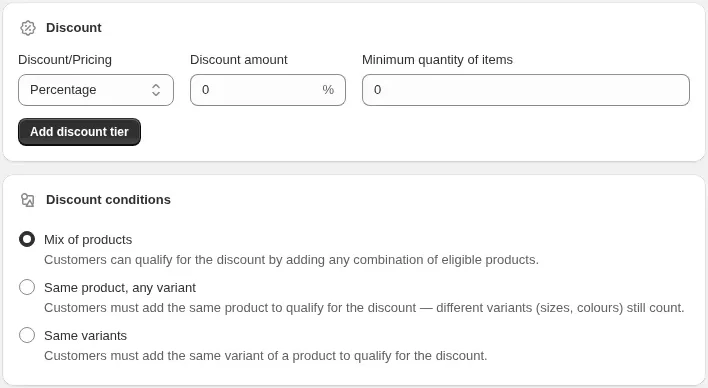
With Fixed amount, a checkbox appears, ticked by default. Its wording follows your Discount conditions (Step 3): "only once per order" with Mix of products, "only once per product" with Same product, any variant, "only once per order line" with Same variants. Clear it when you mean $1 off every item.
Step 3: Decide what counts toward a tier
In Discount conditions, choose Mix of products, Same product, any variant or Same variants. For a price list per product ("6 of this item at $11"), choose Same product, any variant. The quantity discount guide shows which carts reach a tier under each setting.
Step 4: Pick the products
In the Products card, choose All store, Collections, Product tags, Vendors, Product types or Products and variants. Only the products you include count toward a tier and get the saving. Excludes (Lite and above) leaves some out.
Step 5: Check the preview, save, and show the tiers
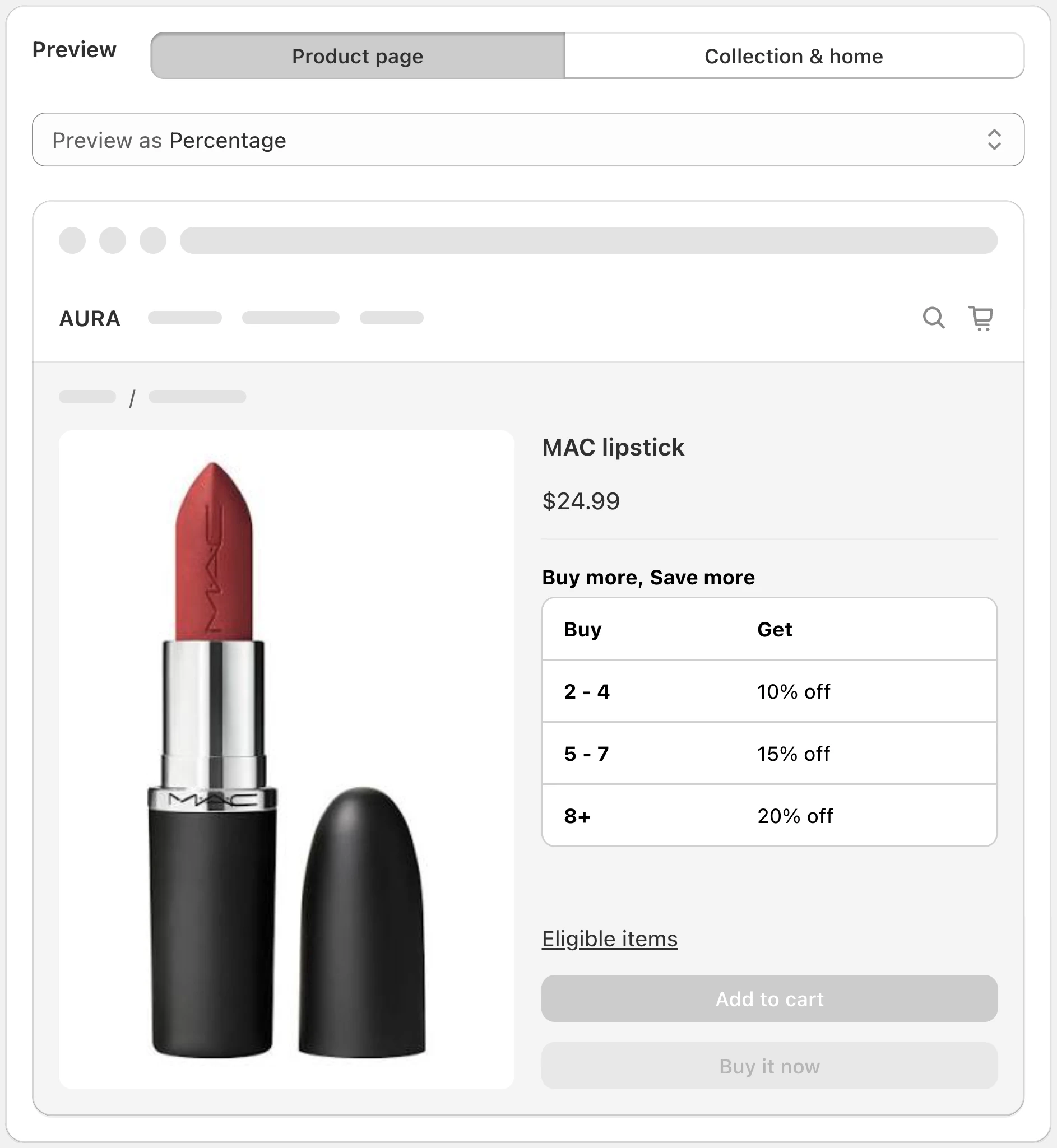
The preview on the right of the form shows a product page and a cart. Change the sample quantities until each tier shows the saving you expect, then save. The status turns Active once Discounty has applied it. Shoppers need no code: the saving shows in the cart and at checkout.
To show the ladder before the cart, switch on the tier table under Customization → Quantity/Value table; the steps are in showing quantity break pricing on the product page, and the table widget guide covers the text and colours.
Full field-by-field steps are in the help center: Quantity discount setup and Cart goal setup.
How does 1 for $12, 6 or more at $11, 24 or more at $9 work out?
Take a store that sells a $12 candle and wants exactly that price list. In a Quantity discount campaign:
- Discount/Pricing: New price.
- Tier 1: Minimum quantity of items 6, new price $11.
- Tier 2: Minimum quantity of items 24, new price $9.
- Discount conditions: Same product, any variant, so scents can be mixed.
- Products: the candle.
One to five candles need no tier: they sell at the regular $12. This ladder has two tiers, so it needs Essential or above.
Price per candle
What the cart costs
At 23 candles, one more makes the whole cart $37 cheaper.
| Candles | At $12 each | With the tiers | Shopper saves |
|---|---|---|---|
| 5 | $60 | $60 | $0 |
| 6 | $72 | 6 × $11 = $66 | $6 |
| 23 | $276 | 23 × $11 = $253 | $23 |
| 24 | $288 | 24 × $9 = $216 | $72 |
Two things to check before you save. First, 24 candles cost less than 23, so anyone near the top step will add up to it. That is the point, as long as the margin holds. Second, run the margin: if a candle costs you $5, you keep $6 per candle at $11 (23 × $6 = $138) and $4 at $9 (24 × $4 = $96). If $96 on a 24-candle order is too thin, raise the top price to $10 and the profit is 24 × $5 = $120.
The same ladder by cart value works the same way. A Cart goal with 10% off from $50 and 15% off from $100 makes a $95 cart cost $85.50 and a $100 cart cost $85.
How do you give fixed unit prices to thousands of products?
New price sets one price for every product in the campaign. That suits a group that shares a regular price, and only that group. For a large catalogue, choose by what the products have in common:
- Products with different prices, same cut per unit: use Fixed amount (with Mix of products), clear Apply "fixed amount" discount only once per order, and set $1 off each from 6 and $3 off each from 24. A $12 item and a $30 item both drop by the same dollars. An item priced below the fixed amount is not discounted.
- Groups at one price: one New price campaign per price point. Tag the products (for example
price-12) and pick them with Product tags, so the campaign covers them all without picking them one by one. - A catalogue that keeps growing: Auto-update adds new products that match the filter and drops ones that stop matching. It is on the Discounty plan and above.
Each plan caps live variants: the number of variants with a discount running at the same time. A size and a colour each make a variant, so thousands of products often mean many thousands of variants. Several thousand variants go past Essential's cap and need the Discounty plan or Ultimate. If a campaign goes over your cap, it shows Needs upgrade instead of running. Check the variant counts on pricing before you include a whole store.
Shopify's B2B volume pricing works the other way round: you enter price breaks product by product in a catalog, up to 10 per product, and they reach company buyers only.
Shopify Scripts is gone. How do you run tiered discounts now?
On Shopify Plus, quantity breaks were often written as a Ruby script. Shopify's Script Editor page says Scripts were deprecated as of 30 June 2026 and points stores to Shopify Functions, small programs that Shopify runs inside its own checkout. Writing a Function is developer work. Quantity discount and Cart goal campaigns already run on Shopify Functions, so a script's quantity or spend tiers can be rebuilt in the form above without code. Scripts that did more than tiers need their own plan.
How do you change or remove the tiers later?
Plan this before you go live, because tiers on a running campaign are locked.
How to undo it
- Change a tier: on an Active campaign, only the end date and end time can change. Deactivate the campaign, edit the tiers, and activate it again.
- Stop the offer: deactivate the campaign. It shows Reverting while Discounty removes the discount, and applies no discount from that moment.
- Your product prices never move. Quantity discount and Cart goal apply in the cart and at checkout and never write to the product's price. There is nothing to restore when the campaign ends.
- On Shopify's own discounts, deactivate or delete each tier's discount in Discounts. Miss one and that step keeps running.
If a tier does not apply in a test order, check that the campaign is Active, the product is in it, and the cart meets the lowest tier under the Discount conditions you chose. The troubleshooting checklist goes through the rest. For each campaign type on its own, see what is a quantity discount and minimum purchase discounts.
Questions
What is a tiered discount?
A discount that grows in steps as the order grows, such as 10% off $50 and 20% off $100, or 10% off 2 items and 20% off 3.
Is a tiered offer the same as a tiered discount?
Yes. A tiered discount is also called a tiered offer or a tiered promotion. Spanish-speaking stores call it a descuento escalonado, a stepped discount; descuentos escalonados is the plural.
Can I set up tiered pricing on Shopify without editing my theme?
Yes. Shopify's admin does it with one automatic discount per tier. Discounty does it with one Quantity discount or Cart goal campaign, and shows the tiers through a widget you switch on, not code.
Can quantity tiers and cart-value tiers run on the same cart?
Not in Discounty today: Quantity discount and Cart goal campaigns cannot combine with each other. Pick the one that matches how your products are priced.
How many tiers should a discount have?
Two or three. More steps are harder to follow, and the shopper should be able to work out the next one in their head.
Do I need a paid plan for more than one tier?
One tier runs on Starter. Two or more tiers in one campaign need the Essential plan or above.
 How to Put a Whole Shopify Collection on Sale, With the Old Price Crossed Out
 BOGO on Shopify: What It Is and How to Set It Up
 Automatic Discounts on Shopify: How to Set One Up