


BOGO on Shopify: What It Is and How to Set It Up
Buy one, get one, buy two get one free, half off the second in a collection: the settings for each, in Shopify and in an app, and what they cost you.
In Discounty: Buy X get Y See how Shopify Buy X Get Y offers work
BOGO stands for "buy one, get one": when a customer buys one item, they get a second item free or at a discount. "Buy one get one free" is the classic version. "Buy one get one 50% off" (BOGO 50) means the second item is half price. In some markets the same offer is called "buy 1 take 1".
Buy 1 get 1, buy 2 get 1 free and 50% off the second item in a collection are all the same discount on Shopify: Buy X get Y. X is what the shopper must buy, Y is what they get, and you set how much comes off Y. Shopify has one built in, under Discounts → Create discount → Buy X get Y. An app is worth it when you need what Shopify leaves to the shopper: finding the reward, seeing the offer before the cart, or getting the right item discounted.
Free is the version stores choose most. Of all Buy X get Y campaigns stores have created in Discounty, 63% make the reward free and 9% take half off it.
What does BOGO 50% off mean?
The customer pays full price for the first item and half price for the second. On two $40 items they pay $60, a saving of 25% on the pair. When the two items differ in price, someone has to decide which one gets the discount. In Shopify's own discount that is decided for you; in Discounty you choose, as the steps below show.
Which settings make which offer?
Every buy X get Y offer is built from the same three blocks, in Shopify and in Discounty:
| The offer | Customer buys (X) | Customer gets (Y) | Discount on Y |
|---|---|---|---|
| Buy 1 get 1 free | 1 of the product | 1 of the same product | Free |
| Buy 2 get 1 free | 2 of the product | 1 of the same product | Free |
| Buy 1, get the second 50% off, same collection | 1 from the collection | 1 from the same collection | 50% |
| Buy 4 flavours, get the 5th free | 4 from the collection | 1 from the same collection | Free |
| Buy a product, get a different one free | 1 of product A | 1 of product B | Free |
| Spend $50, get a gift | A minimum spend of $50 | 1 of the gift product | Free |
When X and Y are the same product or collection, the units that meet the condition are not the discounted ones. Buy 2 get 1 free needs three units in the cart, and the third is free.
How do you set up buy X get Y in Shopify itself?
Shopify's own discount covers the basic offer. These are the steps and setting names from Shopify's Help Center page on buy X get Y discounts, read on 27 October 2026:
- In your Shopify admin, go to Discounts, click Create discount and choose Buy X get Y.
- Under Method, choose Discount code and type the code, or Automatic discount and give it a title.
- Under Customer buys, choose Minimum quantity of items or Minimum purchase amount and set the number. Under Any items from, choose Specific products or Specific collections.
- Under Customer gets, set the quantity and pick the products or collection. Under At a discounted value, choose Percentage, Amount off each or Free. If you want, tick Set the maximum number of uses per order to cap how many times the offer applies in one cart.
- Set Eligibility, Combinations and Active dates, then click Save.
Where it breaks
- The shopper adds the free item. Shopify's Help Center says customers must add all the qualifying items themselves, and the free or discounted item is never added for them. A shopper who stops at two pays full price, and nothing tells them a third was free.
- Nobody sees the offer before the cart. The discount form has no setting that shows the offer on the product page. Whether your theme shows it is up to the theme.
- You do not pick the discounted item. When the same product is in both blocks, Shopify discounts the lower-priced item. There is no setting to discount the higher-priced one.
- You cannot ask for different items. "Buy 4 different flavours" has no setting. Any 4 items from the collection count, including 4 of the same flavour.
- A free item that sells out stops the offer. It shows as sold out and the discount cannot be used.
- Shopify caps automatic discounts. A store can run up to 25 active automatic discounts at a time, app discounts included.
- POS needs POS Pro. On POS Lite the discount works only at online checkout.
How do you set up buy X get Y in Discounty?
In Discounty, a BOGO is a Buy X get Y campaign: the same three blocks, plus how the shopper gets the reward and which item is discounted. The full walkthrough is in the Help Center guide How to create a Buy X get Y campaign.
Buy X get Y is on the Lite plan and up. Choosing the lowest-priced reward item is on the Essential plan and up. Customer segments are on the Discounty plan and up, and so is stacking two product discounts on one item, which also needs Shopify Plus. Adding a free gift to the cart automatically is on the Discounty plan and up; the floating button that reopens the pop-up is on Essential and up. Plans and prices are on the pricing page.
- Open Campaigns, click Create campaign and choose Buy X get Y. To start from a ready setup, open Templates & use cases: Free gift with purchase fills in a "buy 2 items, get a free gift" campaign.
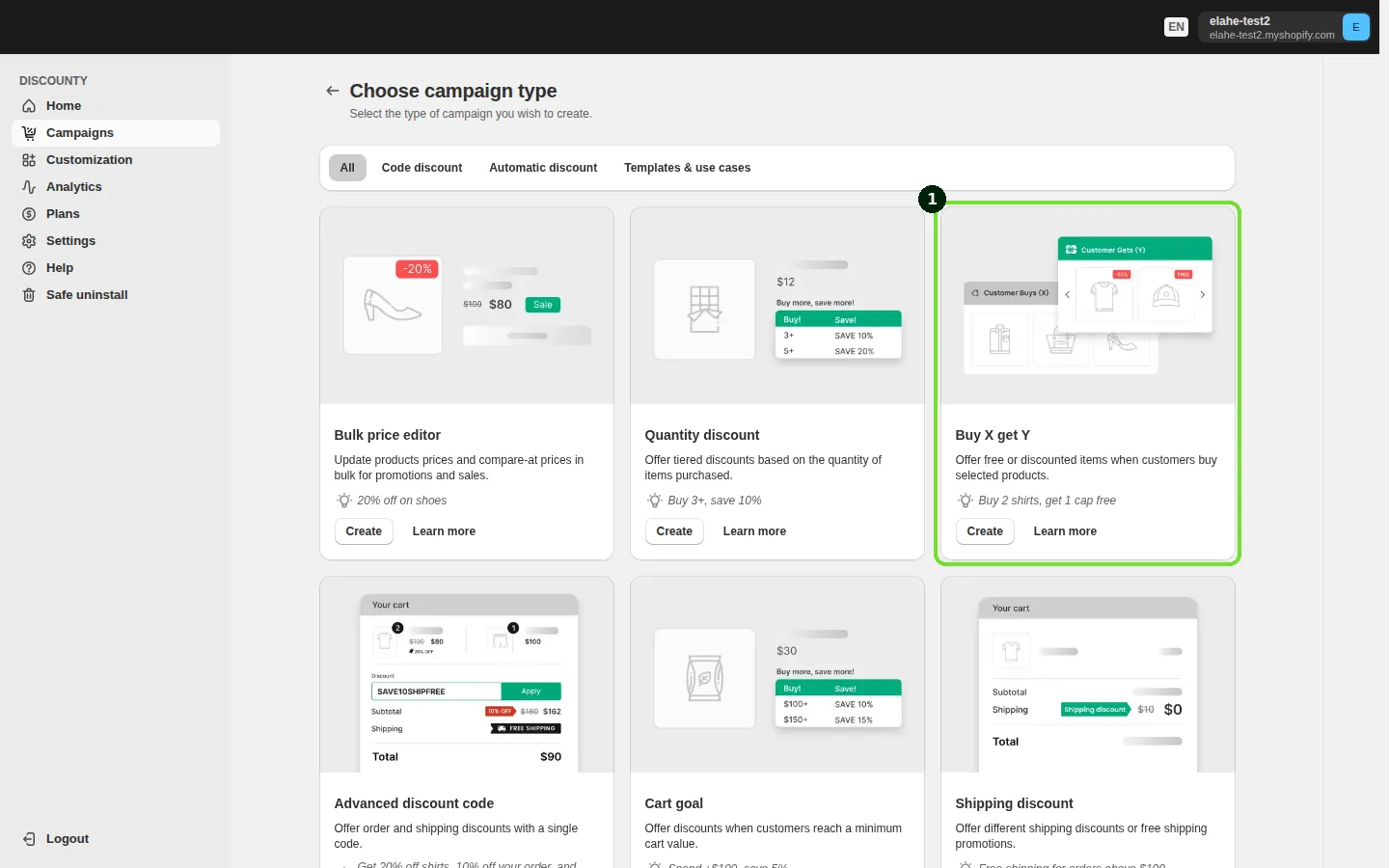
- In the Discount method card, choose Automatic or Discount code. Automatic applies the reward in the cart once the condition is met. With Discount code the shopper enters your code at checkout, and the reward is discounted only if the cart qualifies.
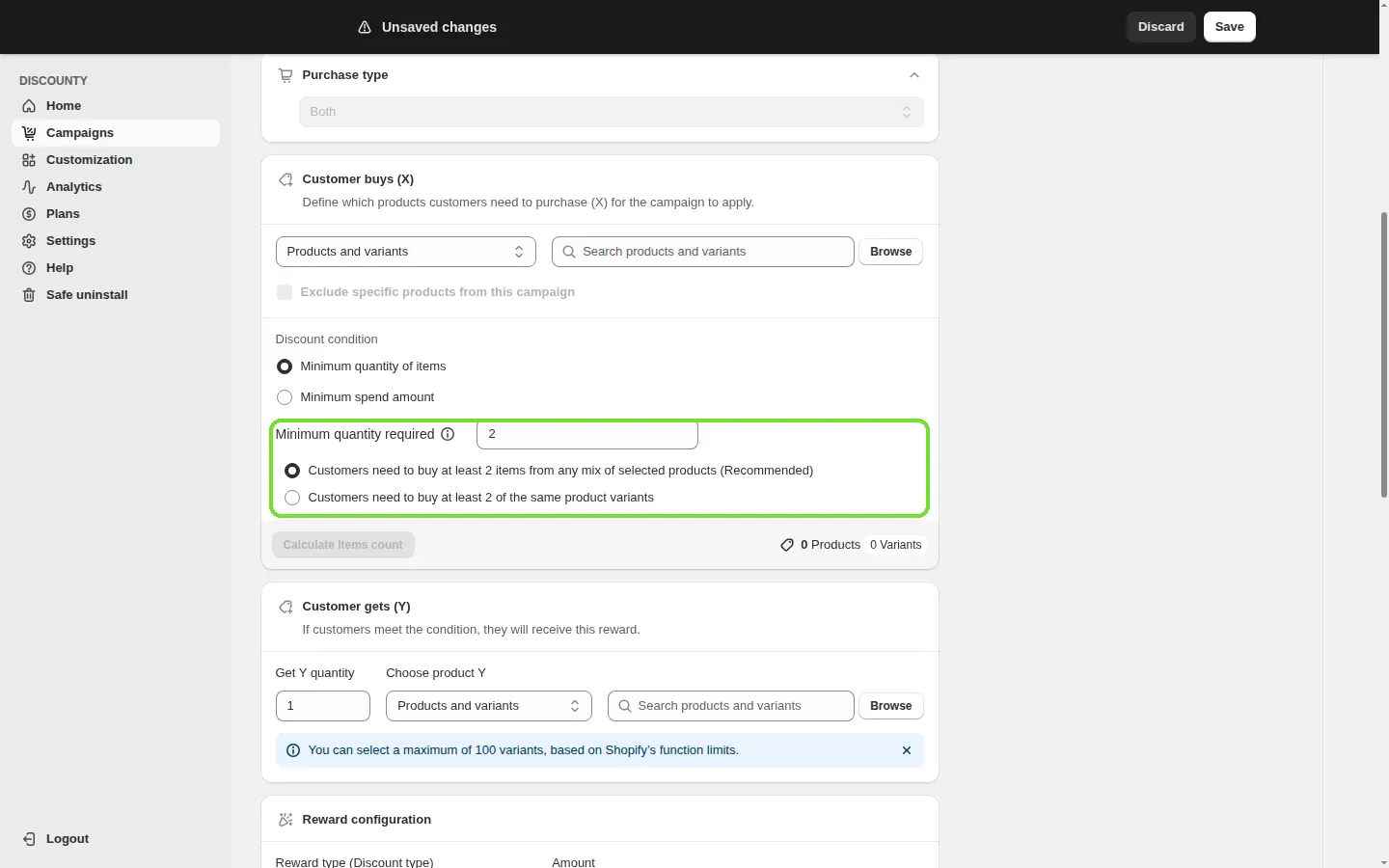
- Under Customer buys (X), pick the products by collection, tag, vendor, product type or one by one. Choose Minimum quantity of items or Minimum spend amount. With a quantity, set Minimum quantity required and how it is counted: any mix of selected products, or the same product variants.
- Under Customer gets (Y), set Get Y quantity and Choose product Y: specific products and variants (up to 100 variants), collections, tags or the whole store.
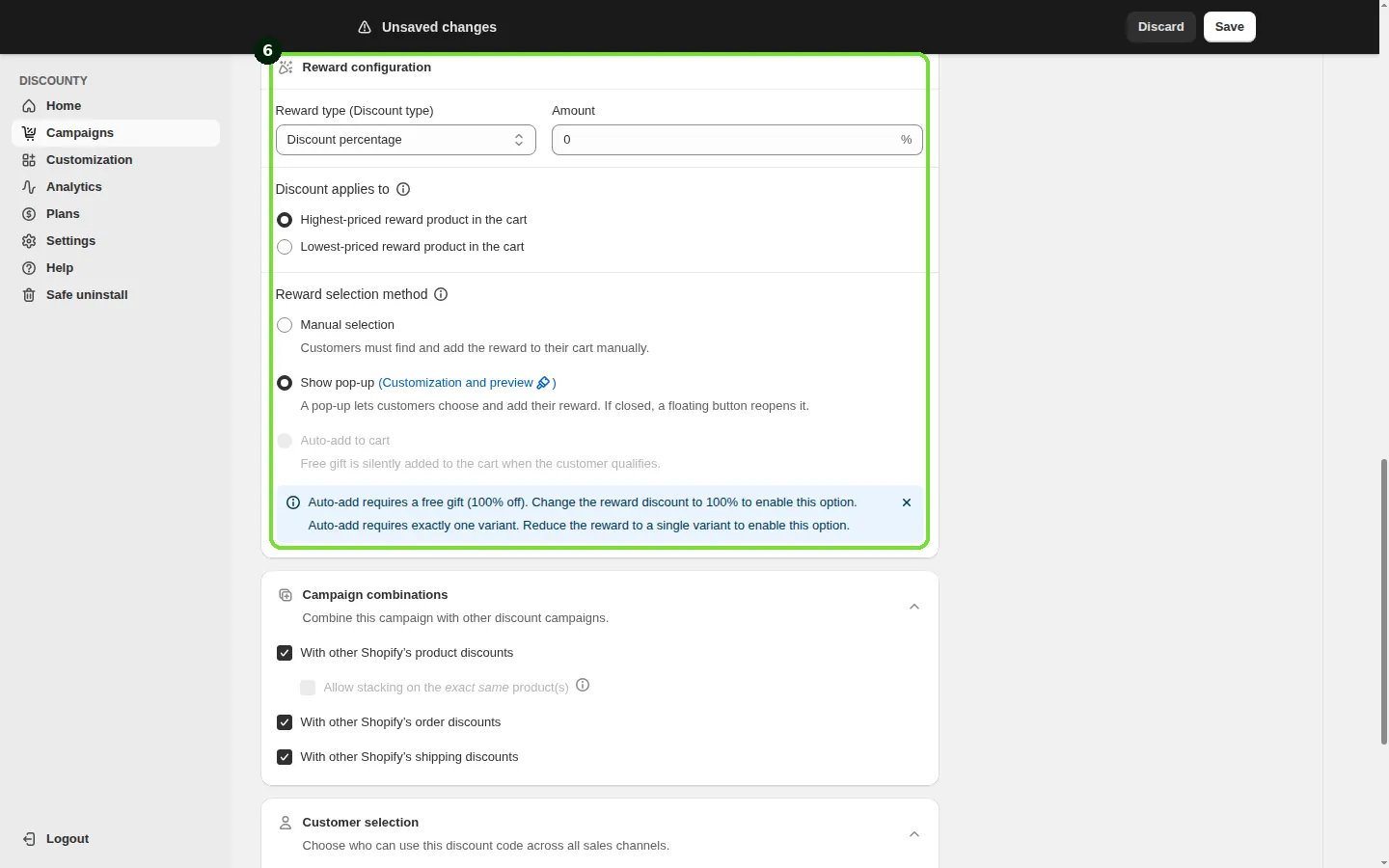
- In Reward configuration, set the Reward type (Discount type): Discount percentage, Fixed amount discount or Free gift. Free gift locks the amount to 100%.
- Under Discount applies to, choose Highest-priced reward product in the cart or Lowest-priced reward product in the cart. This matters whenever the reward items have different prices.
- Under Reward selection method, choose how the shopper gets the reward. Manual selection works like Shopify's: they add it themselves. Show pop-up opens a window where they pick the reward and add it, and a floating button reopens it if they close it; it needs Y set to specific products and variants. Show pop-up needs the Discounty app embed turned on in your theme. A third option adds a single free gift to the cart for the shopper.
- In Campaign combinations, the reward combines with Shopify's product, order and shipping discounts by default. Set Customer selection and the Start date, plus Set end date if you want it to stop on its own. Save.
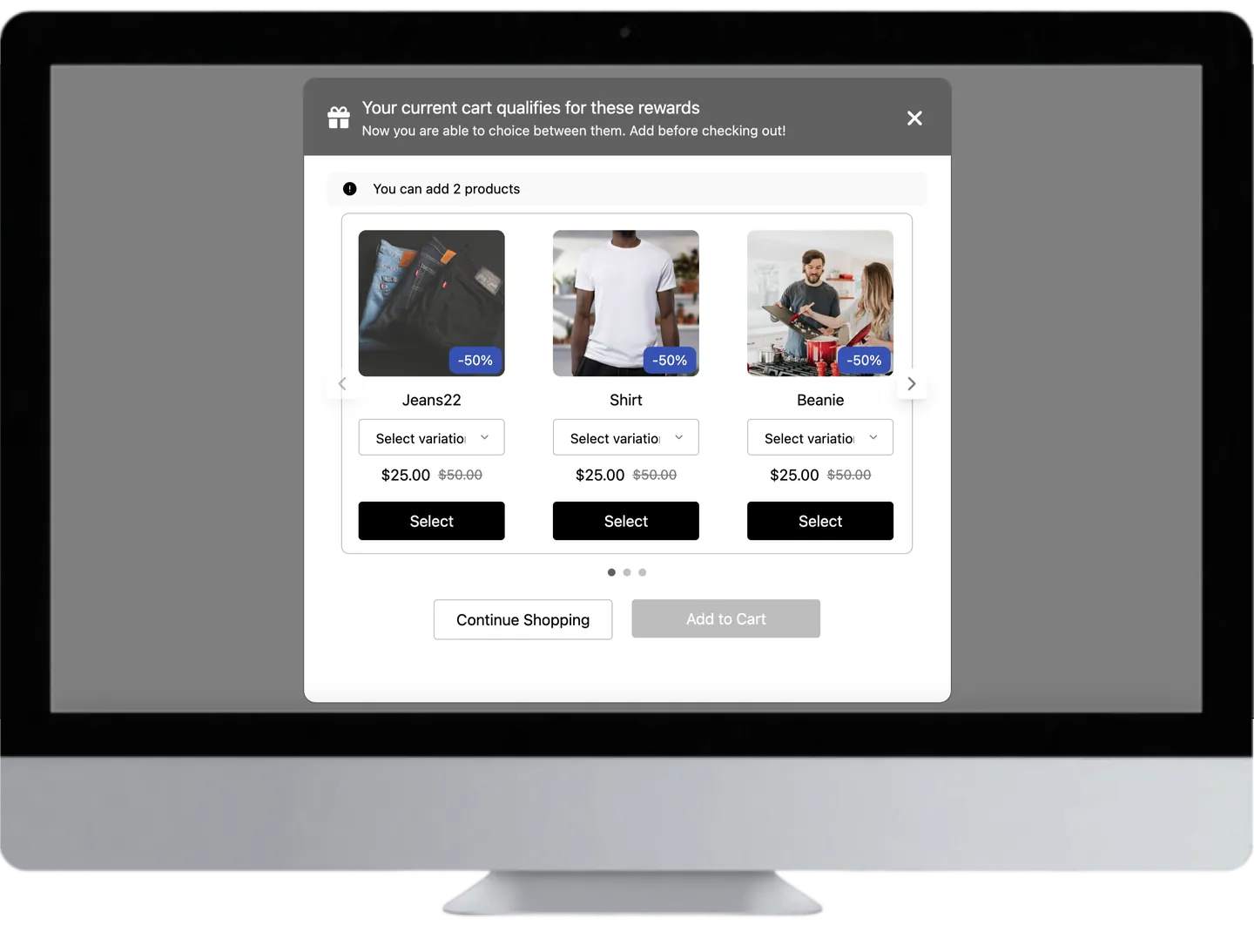
To show the deal before anything is in the cart, turn on the Buy X get Y offer widget under Customization. It puts a line such as "Buy 2 of this item, get FREE" on product pages and a badge on product cards. Both are off until you switch them on, and both need the Discounty app embed in your theme.
Buy 2 get 1 free
Set Minimum quantity required to 2, pick the product under both X and Y, set Get Y quantity to 1, and choose Free gift. The shopper needs three units in the cart. One catch: Get Y quantity is fixed. A shopper who adds six units still gets one free, not two. A second reward at a higher threshold needs a second campaign, and the two can then both apply. If what you want is a bigger discount for buying more units, a tiered quantity discount does that in one campaign.
Buy one, get the second 50% off in the same collection
Choose the collection under X with Minimum quantity required 1 and any mix of selected products. Choose the same collection under Y with Get Y quantity 1. Set Discount percentage to 50, and under Discount applies to choose Lowest-priced reward product in the cart, so the cheaper item is the half-price one. With collections as Y, the pop-up is not available; use Manual selection.
Buy 4 different flavours, get the 5th free
The honest answer first: Discounty has no setting that requires the four items to be different. Neither does Shopify. The two counting choices are any mix of selected products, where 4 of one flavour also qualifies, and the same product variants, which asks for 4 of the exact same one. The closest setup puts the flavours collection under X, with Minimum quantity required 4 and any mix. Under Y, use the same collection with Get Y quantity 1 and Free gift, and pick Lowest-priced reward product so the cheapest of the five is free. Write the offer as "any 5 flavours, the 5th is free" so it says what the cart does.
What to check in any buy X get Y app
Whichever app you weigh, these questions decide whether the offer works at checkout. Here is how Discounty answers each.
| Ask the app | Why it matters | In Discounty |
|---|---|---|
| Does the discount run through Shopify's own checkout? | Discounts applied through draft orders or scripts injected into the theme do not carry into an AI checkout | Buy X get Y runs on Shopify Functions at Shopify's checkout |
| Automatic, code, or both? | Some offers belong to everyone, some only to an email list | Both, chosen in the Discount method card |
| How does the shopper get the reward? | A reward the shopper does not find is a reward they do not get | Manual selection, Show pop-up, or added to the cart for a single free gift (Discounty plan and up) |
| Can you choose which item is discounted? | On mixed prices it changes your margin per order | Highest-priced or lowest-priced reward product |
| Does it show the offer on the product page? | Shoppers act on an offer they can see | The Buy X get Y offer widget, on product pages and product cards |
| What happens with your other discounts? | Two discounts on one item can give away more than you planned | Only the better one applies by default; stacking both needs Shopify Plus and the Discounty plan or above |
| Does it work at your POS? | In-store staff need the same offer | The Discounty Campaigns tile lists the rewards a POS cart has earned |
| How do you switch it off? | You will want to end it cleanly | Deactivate; see the last step below |
What are the rules for a "free" offer?
In the US, the Federal Trade Commission's Guide Concerning Use of the Word "Free" (16 CFR 251.1) sets out three points that apply to BOGO free:
- Do not raise the first item's price. The item the customer buys should be at its regular price, the price it actually sold at over the previous 30 days.
- State the conditions next to the offer. A footnote behind an asterisk does not count.
- Do not run it all the time. The guide says a free offer on the same product should not run for more than six months in any 12 months.
Other countries have their own rules. Check yours before you call an item free.
Worked example: a candle shop runs "the second at half price"
A candle shop sells a Vanilla candle at $24 and a Fig candle at $18, both in a Candles collection. It sets up buy one, get the second 50% off across the collection: X and Y are both Candles, quantities 1 and 1, Discount percentage 50.
With Lowest-priced reward product in the cart, the Fig drops from $18 to $9 and one of each costs $33 instead of $42. With Highest-priced, the Vanilla drops to $12 and the order is $30. On this pair, choosing lowest-priced keeps $3 more for the shop. Two Vanilla and one Fig still get one item at half price, because Get Y quantity is 1: $66 minus $9 is $57.
What does a BOGO cost the store?
A free second item costs you the whole unit. Take a product that sells for $30 and costs you $12:
| Profit on the order | |
|---|---|
| One item at full price | $18 |
| Buy one get one 50% off ($45 for two) | $21 |
| Buy one get one free ($30 for two) | $6 |
BOGO free suits products where the unit cost is low next to the price, or stock you need to move. BOGO 50 keeps more of the margin.
How to undo it
In Shopify's own discounts, open the discount on the Discounts page and click Deactivate under its name. Deactivating is temporary; deleting is permanent.
In Discounty, deactivate the campaign. It shows as Reverting while Discounty removes the discount, and applies no discount from then on. Product prices are untouched either way: Buy X get Y works only in the cart.
On an Active campaign you can change only the end date and end time. To change anything else, deactivate it and edit.
If the reward is not applying, the Buy X get Y FAQs cover the usual causes. Two common ones: Y is set to a collection while the pop-up is on, or another product discount wins on the same item.
How we counted
The two shares are the proportion of all Buy X get Y campaigns in Discounty whose reward is free (100% off) or half off. We read them from our own records on 9 October 2026. They are shares across campaigns; no single store can be identified from them. The candle and profit figures are arithmetic on example prices. The Shopify steps are from Shopify's Help Center, read on 27 October 2026.
Questions
What does BOGO mean?
Buy one, get one. When the customer buys one item, they get a second item free or at a discount.
How do I set up buy 2 get 1 free on Shopify?
Create a Buy X get Y discount: buy 2 of the product, get 1 of the same product, Free. The third unit in the cart is the free one.
Does Shopify add the free item to the cart?
Not in its own Buy X get Y discount. Shopify's Help Center says the free or discounted item is never added for the customer. An app can add it or offer it in a pop-up.
Can BOGO combine with a discount code?
Yes, if both discounts allow it. A Buy X get Y campaign in Discounty combines with order and shipping discounts by default, and the code has to be set to combine with product discounts too. If both are product discounts on the same item, Shopify applies the better one. Applying both needs Shopify Plus and the Discounty plan or higher. Since October 2026 a Buy X get Y campaign can also run on its own code, through the Discount code method.
Is BOGO better than a percentage discount?
They do different jobs. A percentage lowers the price of what the customer was buying anyway. BOGO makes the order bigger. Haipeng Chen and colleagues (Journal of Marketing, 2012) found in a store field test that a bonus pack of 50% more product sold substantially more than a 35% price cut.
 How to Put a Whole Shopify Collection on Sale, With the Old Price Crossed Out
 What Is a Tiered Discount? Set Up Tiered Pricing on Shopify
 Automatic Discounts on Shopify: How to Set One Up