


Shopify Discount Apps Compared: Pick by the Sale (2026)
There is no single right app. There is a right app for the sale you are about to run, and five questions that tell you whether it will hold up.

In Discounty: Bulk price editor See how the Shopify bulk price editor works
The best Shopify discount app is the one built for the sale you are running. A storewide markdown needs a sale price editor. "Buy more, save more" needs a quantity break app. Buy one get one needs a gift app. The table below lists the top apps for each.
Search the Shopify App Store for "discount" and you get thousands of apps. The top two dozen all have ratings between 4.8 and 5.0. So the rating will not help you choose.
What helps is the sale you are about to run. A storewide markdown, "buy 3, save 10%", a free gift and a bundle are four different jobs. Most apps are built around one of them.
This guide sorts the top results by that job. We make one of the apps on the list, Discounty, so we say plainly where it fits and where it does not.
The apps and their ratings below are as the App Store showed them on 4 October 2026, in the US search for "discount". They move every week.
Do you need an app at all?
Shopify's own discounts already cover a lot. From Discounts → Create discount you can set up:
- a percentage or fixed amount off products or the order
- buy X get Y
- free shipping
- each one as a code, or as an automatic discount with no code
If your sale is one of those, on a few products, for a few days, you may not need an app.
You start to need one when the sale gets bigger than the form. That usually means one of four things:
- Many products, real prices. You want the sale price written onto every product, so it shows on the product page, in Google Shopping and at POS.
- Tiers. "Buy 2, save 5%. Buy 4, save 10%." Shopify's form has one threshold per discount.
- Something on the page. A tier table, a gift pop-up, a free-shipping bar. Shopify applies the discount but does not advertise it.
- Dates you will not be awake for. A sale that opens at midnight and closes itself.
Shopify allows 25 active automatic discounts per store, and that count includes discounts created by apps. If you run several apps at once, they share the same 25.
Which kind of app do you need?
Here are the discount apps that came up when we searched the App Store for "discount", with what each is built for, in our words. Ratings, review counts and pricing are as each listing showed them in October 2026. The sections below group them by the sale they run.
| App | Built for | Rating | Reviews | Pricing |
|---|---|---|---|---|
| Discounty | Markdowns, quantity tiers, cart goals, gifts, codes and shipping | 4.9 | 1,274 reviews | Free plan |
| Pumper | Quantity breaks, bundles, free gifts | 4.9 | 3,523 | Free plan |
| Kite | Free gifts, buy X get Y, BOGO | 4.9 | 1,259 | Free to install |
| Revy | Product bundles | 4.8 | 728 | Free to install |
| Dealeasy | Quantity discounts and tiered pricing | 4.9 | 633 | Free to install |
| Heartcoding Sales & Discounts | Scheduled sales | 4.9 | 495 | Free plan |
| Rockit | Flash sales and bulk price edits | 5.0 | 494 | Free plan |
| SMART Bundles | Bundles, BOGO, quantity breaks | 4.9 | 417 | Free |
| AIOD: Discounts, BOGO & Gifts | BOGO, free gifts and bundles, also at POS | 4.7 | 365 | Free plan |
| Alpha: Sale & Discount Manager | Sale prices and coupons | 4.9 | 307 | Free |
| Bulk Discount Code Bot | Unique discount codes in bulk | 4.9 | 275 | Free plan |
| Discount Mixer | Volume discounts, buy X get Y, codes | 5.0 | 243 | Free plan |
| ETP Shipping Discount | Shipping discount rules | 5.0 | 105 | Free plan |
| Entafix | Generating codes in bulk | 5.0 | 44 | Free plan |
A few of the top results do something else entirely: a discount for paying by a particular method, an email pop-up with a spin wheel, checkout rules. They are discount-adjacent. If that is the job, they are worth a look, but they will not run a sale.
Marking down many products at once
This is the classic sale: 20% off a collection from Friday to Monday. A markdown app writes the new price onto each product and moves the old one into the compare-at price. Most themes then strike through the old price for you.
Why it matters: the sale price is the product's real price for the length of the sale. It shows on collection pages, in Google Shopping, at POS and in AI shopping assistants, because they all read the same price field.
What to check when you set it up:
- Both dates, set when you create the campaign. A sale with no end date stays on until someone remembers it.
- Price endings. A 20% cut on $24.99 lands on $19.99, and on $37 it lands on $29.60. Decide whether you want endings like .99.
- Products that already have a compare-at price. Ask the app whether it discounts from the current price or from the compare-at price, because the answer changes how deep the cut goes.
Worked example: a $50 jacket with no compare-at price, 20% off. The price becomes $40 and the compare-at price becomes $50. On Tuesday the campaign ends and the price goes back to $50.
The catch is the uninstall. Because the app changed the price itself, removing the app without ending the campaign can leave the sale price in place. Ask any markdown app what it does on uninstall before you install it.
In Discounty this is the Bulk price editor, and it is on the free plan. It has a Safe uninstall step that ends every campaign and puts the prices back before you remove the app.
Buy more, save more
Quantity breaks reward the second and third item: "Buy 2, save 5%. Buy 4, save 10%." Spend tiers do the same with the cart total. Both are applied in the cart and at checkout, and the product price never changes.
Why it matters: a tier only works if the shopper sees it before adding to cart. So the table on the product page matters as much as the discount itself.
What to check:
- Whether the app shows a tier table on the product page, and whether it works on your theme. Open a product page on your live theme as well as in the app's preview.
- How the tiers count. Does "buy 3" mean any three products in the campaign, three of the same product in any size, or three of the exact same variant? Shoppers mixing sizes is the most common reason a tier does not apply.
- Whether it stacks with your markdown. A quantity break on top of a sale price can go deeper than you planned.
Worked example: tiers of 5% at 2 items and 10% at 4. A shopper adds four $25 T-shirts in two sizes. Counted as any variant of the product, that is $100 less 10%, so $90. Counted as the same variant, no tier applies at all.
Discounty runs this as Quantity discount and, for cart value, Cart goal. Both are on the free plan. Both let you choose between mixing products, the same variant, or the same product in any variant. More than one tier needs the Essential plan.
Free gifts and buy one, get one
A gift-with-purchase app watches the cart and adds the reward when the cart qualifies. The good ones also tell the shopper they have earned it, with a pop-up or a progress bar.
What to check:
- How the gift reaches the cart: added automatically, picked from a pop-up, or added by the shopper. Ask whether automatic adding still works when the gift comes in several sizes.
- What happens on your cart drawer. Gift pop-ups and cart drawers vary by theme, so test on your live theme on a phone.
- Two gift offers on the same product. Ask which one wins.
In Discounty this is Buy X get Y. It is not on the free plan. From the Lite plan, a pop-up offers the gift; on the Discounty plan it can also add a free gift with a single variant to the cart for the shopper. Several Buy X get Y campaigns on the same product have no priority order, so they can overlap. Keep one offer per product.
Cirkle Studio's AIOD is an automatic discount app Shopify stores use for BOGO offers and free gifts, including at POS.
Bundles
A bundle app sells several products together, usually as a new listing or a "frequently bought together" block, with one discounted price.
Discounty does not build bundles. Its six campaign types are markdowns, quantity and spend tiers, gifts, codes and shipping. If a bundle is the sale you want, an app from the bundle row above is the right tool.
Codes and shipping discounts
Two separate jobs share this row.
Codes in bulk are for influencers, partners and one-time customer codes. An app that generates and exports hundreds of codes saves you making them one by one.
Shipping discounts set free or reduced shipping by cart value, region or product. The useful extra is a progress bar: "You are $12 away from free shipping."
Discounty covers both. Advanced discount code puts a product, order and shipping discount under one code, and Shipping discount works with or without a code. Neither is on the free plan.
A code never applies itself. That is true at your own checkout and in AI checkouts like ChatGPT: someone has to enter it. If your Black Friday sale runs on a code, put the code where the shopper sees it.
Apps that work alongside a discount app
A discount app runs the offer. These three help it land. All three are apps we work with as partners.
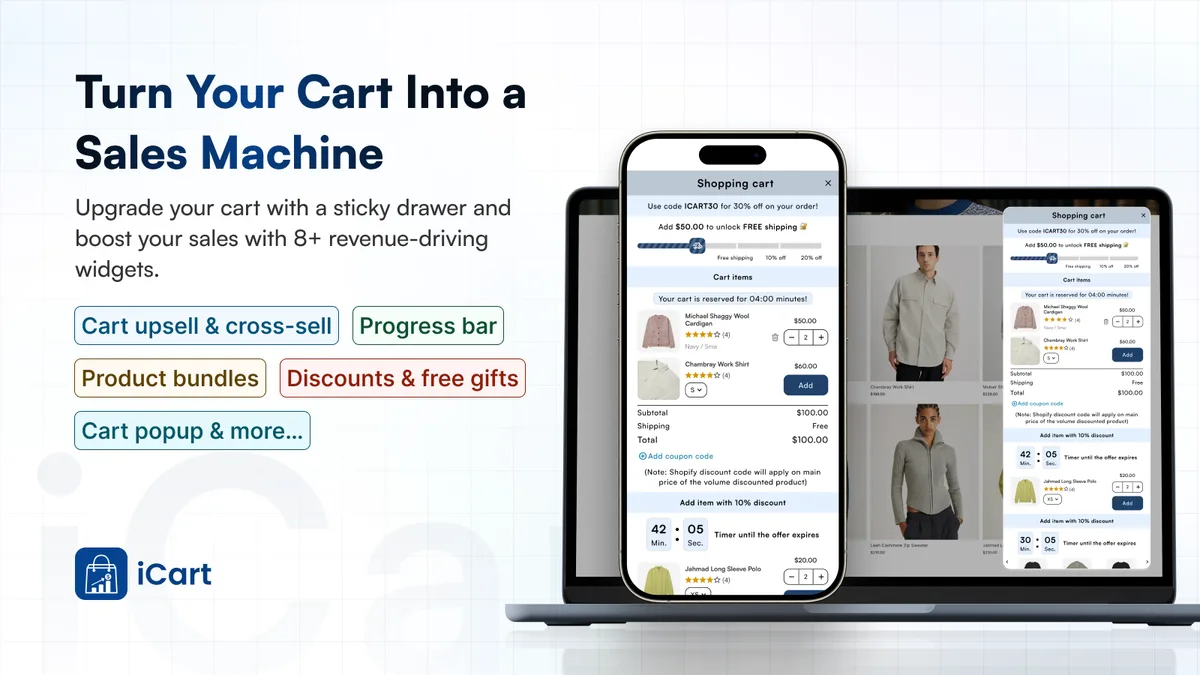
iCart Cart Drawer Cart Upsell replaces the basic cart with a slide cart drawer, mini cart or cart page. It adds in-cart upsells, bundles, a progress bar and a countdown timer, so shoppers add more before checkout. Built for Shopify, 4.7 from 451 reviews.
WhatsApp marketing and cart recovery: Kanal. Kanal turns WhatsApp into a sales channel for Shopify stores. You can recover abandoned carts, send targeted campaigns and let an AI agent answer customer questions, all synced with Shopify. During BFCM, merchants use it to announce their offers and bring shoppers back to their carts.
Bulk Discount Code Bot, from Seguno, creates unique, one-time discount codes in bulk, so each customer gets a code of their own for an email, SMS or influencer campaign. You can export the codes to CSV for any channel and see revenue and redemptions by campaign.
Five questions to ask any discount app before Black Friday
These matter more than the feature list. Each one is about what happens when something goes wrong in your busiest week.
1. How does it apply the discount?
There are two standard ways: writing the price onto the product, or a Shopify Function that applies at checkout. Both run on Shopify's side, so they work in every place that uses Shopify's checkout.
Some apps use draft orders, scripts in your theme, or discount links instead. Those can break when the shopper does not arrive the way the app expects, including through an AI assistant.
2. What does it combine with?
Ask whether it stacks with your other discounts, and whether you can turn stacking off. Then count your automatic discounts across every app. The limit of 25 is per store.
3. What happens when you uninstall it?
For a markdown app, the price may stay discounted. For a checkout discount, it simply stops applying. Ask which one it is, and whether the app has a step that ends your campaigns before you leave.
4. What is on the free plan, really?
Most of the top results are free to install. That is not the same as free to run your sale. Check which campaign types and how many products the free plan covers, before you build the campaign.
5. Can you test it on one product first?
Run a small campaign on two or three products this week. Check the price, the cart, the checkout and the prices after it ends. An app that passes on a quiet Tuesday is much less likely to surprise you on Friday.
Where Discounty fits
Discounty is the app we make. Here is the plain version.
| Campaign types | Bulk price editor, Quantity discount, Cart goal, Buy X get Y, Advanced discount code, Shipping discount |
|---|---|
| On the free plan | Bulk price editor, Quantity discount and Cart goal |
| Rating | 4.9 on the Shopify App Store, from 1,274 reviews |
| Does not do | Bundles, spin wheels, email pop-ups |
It fits a store that runs more than one kind of sale in a season and wants them in one place. If you only ever need a bundle, or only ever need one quantity break, a single-purpose app from the table above may suit you better.
Plan limits and prices are on the pricing page.
Questions
What is the most popular discount app on Shopify?
By review count in the top results for "discount" on 4 October 2026, Pumper had the most by a wide margin. A product-label app came next, then Discounty and Kite at about the same level. Review count tells you how long and how widely an app has been used. It does not tell you whether it fits your sale.
What is the best discount app for Shopify?
The one built for the sale you are running. For a storewide markdown, look at a sale price editor. For "buy more, save more", a quantity break app. For gifts, a buy X get Y app. If you run several kinds of sale in a season, one app that covers all of them saves you from stacking three apps on one store.
How do I do 50% off on Shopify?
Without an app: in your Shopify admin go to Discounts → Create discount → Amount off products, choose Percentage, enter 50, pick the products or collections, set the dates and save. With a sale price app, the 50% is written onto each product as its price, so it shows on collection pages and in Google Shopping before checkout.
Are there free discount apps for Shopify?
Most of the top results are free to install, and several have a free plan. Check what the free plan actually runs. A free plan often covers one or two campaign types and a small number of products.
Can I use more than one discount app?
Yes, but they share Shopify's limit of 25 active automatic discounts per store, and their discounts may stack on the same item. Decide which app owns which kind of sale, and test the cart with both running.
Do I need a discount app if Shopify has discounts built in?
Not for a simple code or one automatic discount. You need one when you want tiers, sale prices written onto many products, gifts added to the cart, or a sale that opens and closes on its own.
What happens to my prices if I uninstall a discount app?
It depends on how the app works. An app that writes sale prices onto products can leave them discounted. An app that applies discounts at checkout simply stops. End your campaigns inside the app before you uninstall.
 How to Put a Whole Shopify Collection on Sale, With the Old Price Crossed Out
 What Is a Tiered Discount? Set Up Tiered Pricing on Shopify
 BOGO on Shopify: What It Is and How to Set It Up