


How do I trigger a Buy X get Y reward by amount spent (Spend X get Y)?
Unlock a Buy X get Y reward by spend instead of quantity, for example "Spend $50, get a free gift."
A Buy X get Y campaign can unlock its reward based on how much a customer spends, not only on how many items they add. This lets you run offers like "Spend $50, get a free gift" or "Spend $100, get a bonus item at 50% off", alongside the classic "Buy 3, get 1". Spend-based offers push customers toward a higher cart value without asking them to buy a set number of items.
Discount conditions
Every Buy X get Y campaign has a Discount condition with two options:
Condition | When the reward unlocks | Example |
|---|---|---|
Minimum quantity of items (default) | The customer adds a set number of qualifying items | Buy 3 shirts, get 1 free |
Minimum spend amount | The customer spends at least a set amount on qualifying products | Spend $50 on shirts, get a free hat |
Before you start
You'll work inside a Buy X get Y campaign. Create a new one or edit an existing one. Buy X get Y is available on the Lite plan and above.
Decide which products count toward the spend (the "Buy X" products) and what the reward is (the "Get Y").
Have your spend threshold ready, in your store's currency.
Set up a Spend X get Y campaign
In Discounty, go to Campaigns and create or open a Buy X get Y campaign.
In Customer buys (X), select the products that count toward the spend, as you normally would.
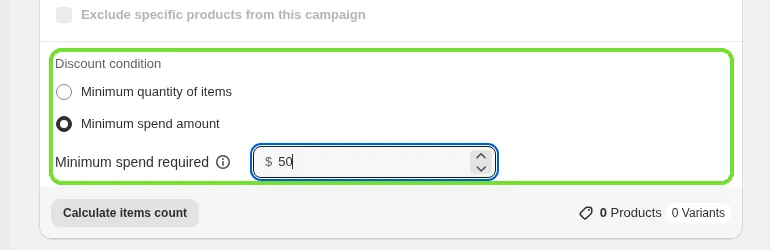
Under Discount condition, choose Minimum spend amount.
In Minimum spend required, enter the amount the customer must spend on the selected products. The field shows your store's currency symbol.
Set up the reward (the "Get Y"): the product and the discount applied to it. See How to create a Buy X get Y (BXGY) campaign in Discounty? for the full reward setup.
Save and activate the campaign.
How the spend is counted
The spend is the total price of all qualifying (X) products in the cart, added together across every cart line, not just one product.
Products that aren't part of your X selection don't count toward the spend.
A free gift that Discounty adds to the cart automatically never counts toward the spend.
How this shows up on the storefront
The spend threshold changes what triggers the reward, not how it's delivered. The reward reaches the customer through the campaign's Reward selection method, the same way as in a quantity-based campaign. If that method is Show pop-up, the Buy X get Y pop-up opens once the cart reaches your Minimum spend required so customers can pick their reward. With Manual selection, customers add the reward themselves, and with Auto-add to cart, the free gift is added for them.
The pop-up doesn't show a running "spend $10 more to unlock" message. It appears only once the threshold is met. To change the pop-up's text, colors and behavior, see How do I customize the Buy X get Y pop-up and floating button?.
Switching between conditions
You can switch a campaign between Minimum quantity of items and Minimum spend amount while editing it:
Minimum quantity of items asks for a whole number (for example, 3).
Minimum spend amount asks for a money value (for example, 50).
When you switch, the value resets: switching to Minimum quantity of items sets it to 1, and switching to Minimum spend amount sets it to 0. Enter your real threshold before you save. A spend of 0 shows "Enter a spend amount" and the campaign won't save.
Selling in multiple currencies
If your store sells internationally, you don't need a separate threshold for each currency. Enter the amount once in your store currency, and Discounty converts it to each customer's checkout currency using Shopify's current exchange rate.
That means a $50 threshold keeps its real value for every customer. A customer checking out in euros or pounds needs to reach the equivalent local amount, not a flat number.
Validation rules
Minimum spend amount must be greater than 0. You can use decimals (for example, 49.99).
Minimum quantity of items must be a whole number of at least 1.
If a value breaks these rules, the campaign won't save until you correct it.
Frequently asked questions
Is the minimum spend measured against the whole cart total?
No. The minimum spend is measured only against the qualifying (X) products in the cart. Other products and auto-added gifts don't count.
Which currency do I enter the minimum spend in?
Your store's currency. Discounty converts it automatically for customers who check out in another currency.
Can one campaign use both a quantity and a spend condition?
No. A Buy X get Y campaign uses one condition at a time: either a minimum quantity or a minimum spend.
Related articles
Need a hand? Contact our support team through the app — we're happy to help.
In Discounty: Buy X get Y See how Shopify Buy X Get Y offers work