


Why don't EU customers see the strike-through price in my Bulk price editor campaign?
EU customers see the sale price but no crossed-out compare-at price? Turn off Shopify's EEA "Hide compare-at" Markets setting.
Your Bulk price editor campaign is live, but customers in the European Union see only the sale price, without the crossed-out original (compare-at) price. That makes the discount much less obvious. This usually comes from a Shopify Markets setting that hides compare-at prices for customers in the European Economic Area (EEA), and you can turn it off in a few clicks.
Applies to: Discounty Bulk price editor campaigns.
Other Discounty campaign types follow different rules — see our troubleshooting guides.
Caution: This page provides general information to merchants regarding the European Price Indication Directive (PID) as a starting point for your own research. You're responsible for reviewing this information and applying it to your business. This content doesn't contain, and isn't meant to provide, legal advice.
Why it happens
Shopify Markets has a Compare-at price setting that hides compare-at prices for EEA customers. When it's on for a market, customers in that market see only the product's price, even though Discounty has set both the price and the compare-at price. The setting only changes what your store displays.
1. Confirm the symptom
Activate your Bulk price editor campaign.
In Shopify admin → Products, open a product in the campaign.
Check that its price and compare-at price show the discount correctly.
Use a VPN or location switcher to view your storefront from an EU country, for example Germany.
Open the same product: the sale price shows, but the original price is missing or not crossed out.
If that matches what you see, continue to step 2.
2. Turn off "Hide compare-at" for EEA customers
In your Shopify admin, click Markets in the left-hand menu.
Click the International market, or any market that includes EEA countries.
Under More settings, click Compare-at price. It shows how many countries or regions compare-at prices are hidden for.
In the pop-up "Hide compare-at prices for European Economic Area (EEA) customers", untick Hide compare-at.
Click Save.
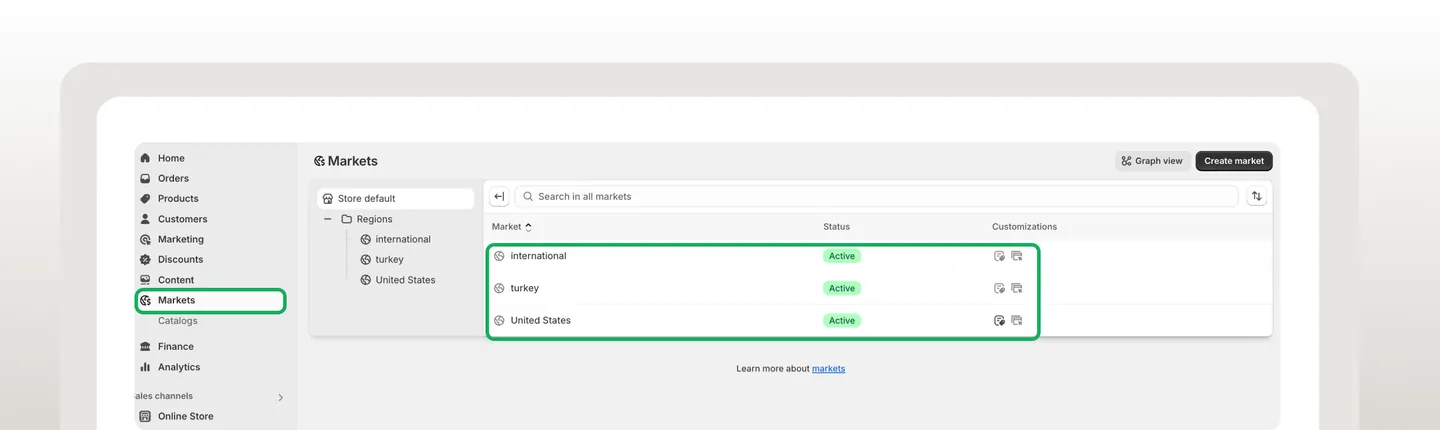
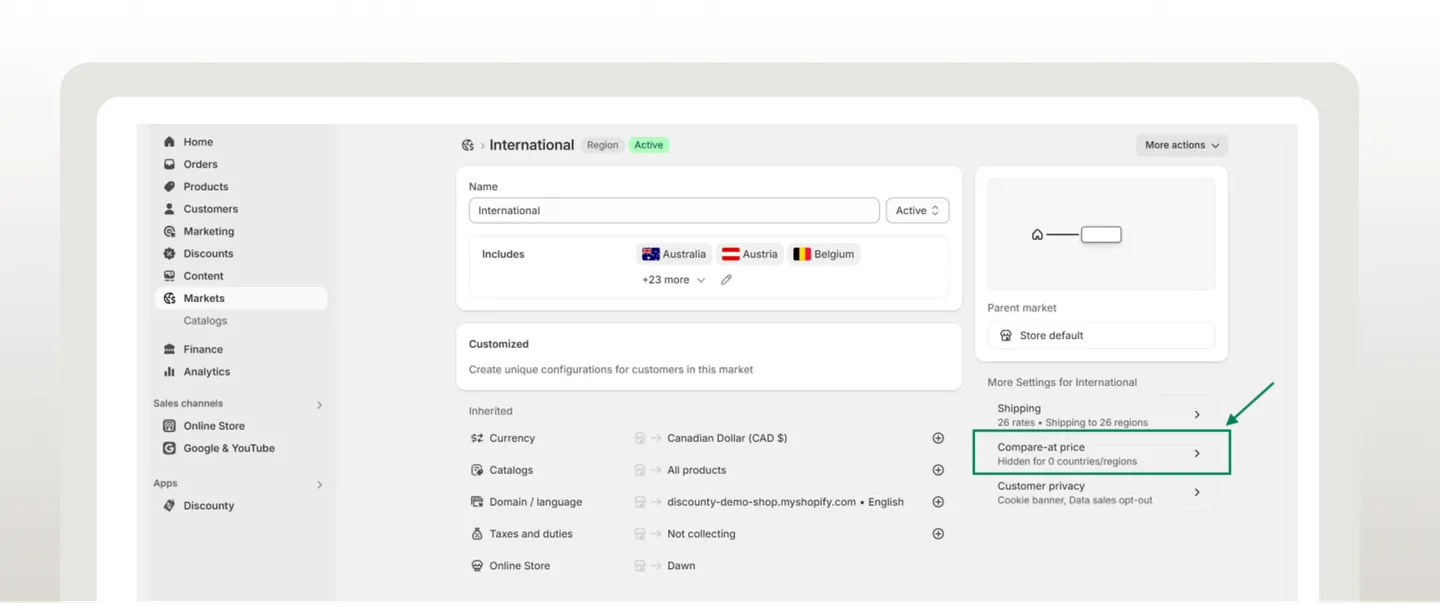
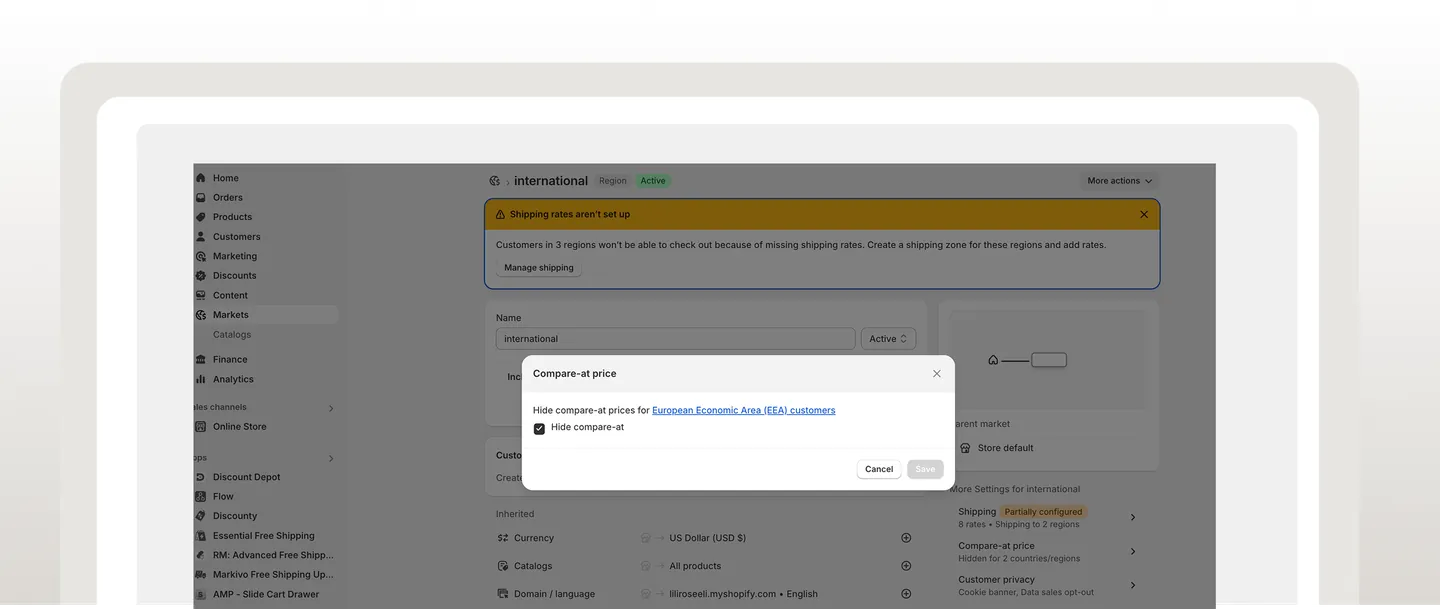
Important: if your store has more than one market that includes EEA countries (for example separate markets for France, Germany or the EU), repeat these steps for each of them. For more on the directive, see Shopify's guide to the European Price Indication Directive.
Your Shopify theme draws the strike-through price directly from the product's Price and Compare at price fields. It doesn't depend on a Discounty app embed or theme-editor setting. Once the Markets setting is off, EEA customers see the compare-at price with no other changes needed. See Where do the strikethrough price and Sale badge come from in a Bulk price editor campaign? for the full picture.
3. Check the fix
Wait a few seconds for the change to take effect.
Refresh the product page, still from an EU location.
You should now see the crossed-out original price next to the sale price.
Related articles
Compare-at price still hidden after these steps? Contact our support team through the app — we're happy to help.