


How to Give a Product Discount, Money Off the Order and Free Shipping With One Code on Shopify
Your email says "15% off yoga gear, $10 off over $100 and free shipping", but in Shopify that is three discounts with three codes. A shopper who types one of them gets one saving.

In Discounty: Advanced discount code See how the Shopify discount code app works
You can’t put a product discount, money off the order and free shipping under one Shopify code: each Shopify discount has one type and its own code. Shopify’s help points to an app for a single discount with more than one saving. Discounty is a Shopify discount app, and its Advanced discount code puts all three under one code, such as MOVE15. Each part applies when its own requirement is met.
How do you give a percentage off, money off the order and free shipping with codes in Shopify?
In Shopify each discount is one type: a product, an order or a shipping discount. Following Shopify’s guide to amount off discounts, for 15% off two products, $10 off orders over $100 and free shipping over $50:
- Go to Discounts > Create discount and click Amount off products. Under Method, choose Discount code and enter a code, such as YOGA15. Pick the products and enter 15%.
- Under Combinations, tick Order discounts and Shipping discounts, then Save. Shopify allows a product discount and an order discount to combine only for eligible stores: not ones with custom
checkout.liquidcode, and not ones running the Licensify app. How discount combinations work covers what each side has to allow. - Create a second discount with Amount off orders: a code such as ORDER10, $10, and a minimum purchase amount of $100. Tick Product discounts and Shipping discounts under Combinations.
- Create a third with Free shipping: a code such as SHIPFREE and a minimum purchase amount of $50. Tick Product discounts and Order discounts under Combinations.
The shopper then types all three codes at checkout.
Where it breaks: one code, several discounts and combinations
- Three codes to share. Every email, post and influencer link has to carry all three, and a shopper who types one gets one saving.
- One code in Shopify means making the rest automatic. You can make the 15% and the free shipping automatic and put only the $10 on a code. Then every shopper who qualifies gets those two, not only the people you sent the code to. Each also takes one of Shopify’s 25 automatic discount slots.
- Both sides have to allow it. Each discount combines only if its own Combinations setting allows the other’s type. Miss one tick and those two don’t combine: the shopper gets one of them, not both.
How do you put three discounts under one code with Discounty?
In Discounty this is an Advanced discount code campaign: one code that can carry a Product discount, an Order discount and a Shipping discount. It is on the Essential plan and up; the pricing page lists what each plan costs. To limit the code to some customers, cap its uses or change its sales channel, you need the Discounty plan (named after the app) or above.
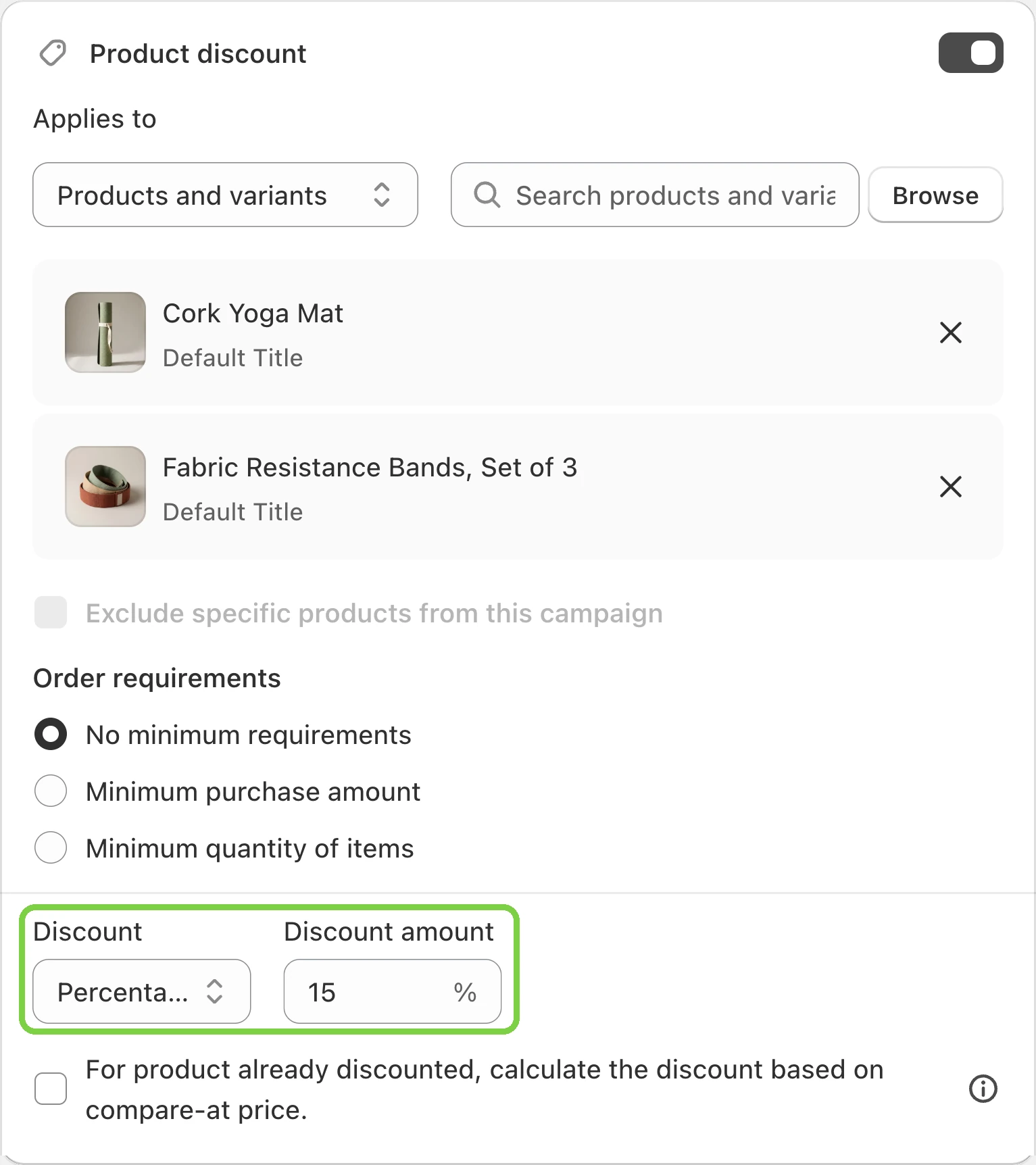
The example: a fitness shop runs MOVE15. It gives 15% off a Cork Yoga Mat and a set of Fabric Resistance Bands, $10 off orders over $100, and free shipping over $50. The form has a card for each part, with a switch in its header. All three start on; turn off any your offer doesn’t need, keeping at least one.
- In Discounty, open Campaigns, click Create campaign and choose Advanced discount code. Enter a Campaign name for yourself, and type MOVE15 in Discount code. If the same code already exists as a Shopify discount, the campaign shows Error when you activate it, so pick another code. The Advanced discount code guide covers every card.
- Leave Sales channels, Purchase type and Maximum discount uses as they are, or limit them.
- In Product discount, choose Products and variants under Applies to and pick the two products. Keep No minimum requirements, choose Percentage and enter 15.
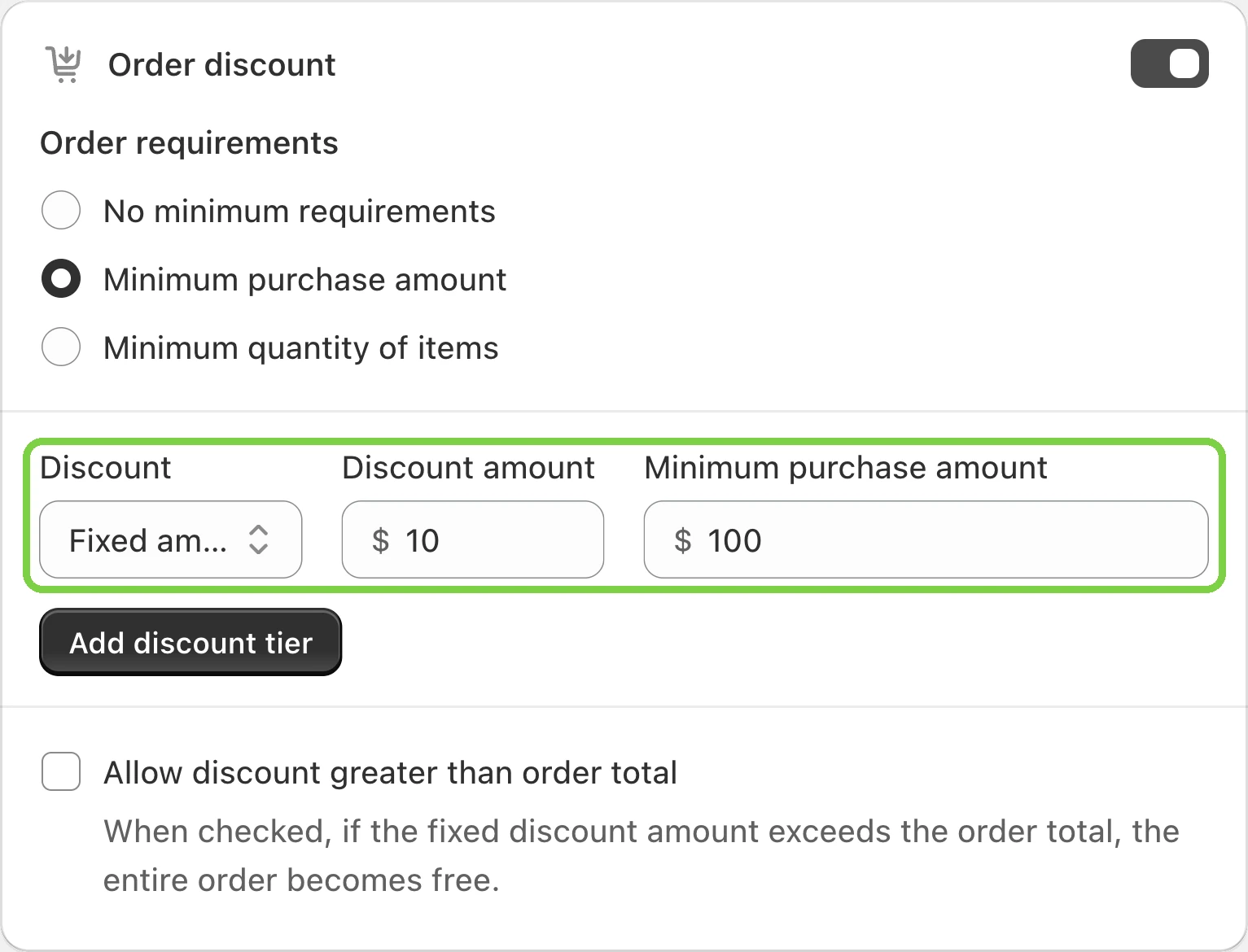
- In Order discount, choose Minimum purchase amount, then Fixed amount. Enter 10 as the discount and 100 as the minimum. The minimum counts everything in the cart, not only the two products.
- In Shipping discount, choose Minimum purchase amount, then Free shipping, and enter 50. This part follows its own minimum only: it isn’t limited to the products in step 3.
- In Combinations, the code combines with nothing by default. If an automatic sale runs at the same time, tick the types it may combine with. That sale has to allow every type the code carries, here product, order and shipping discounts. How discount combinations work covers both sides.
- Set the Start date and, for a sale that ends, Set end date. Discounty reads both in the time zone of the device you save from, as which time zone a sale runs on explains. Check the summary on the right: it lists the code and the three parts. A free shipping part shows there as “100% off”. Save, then click Activate.
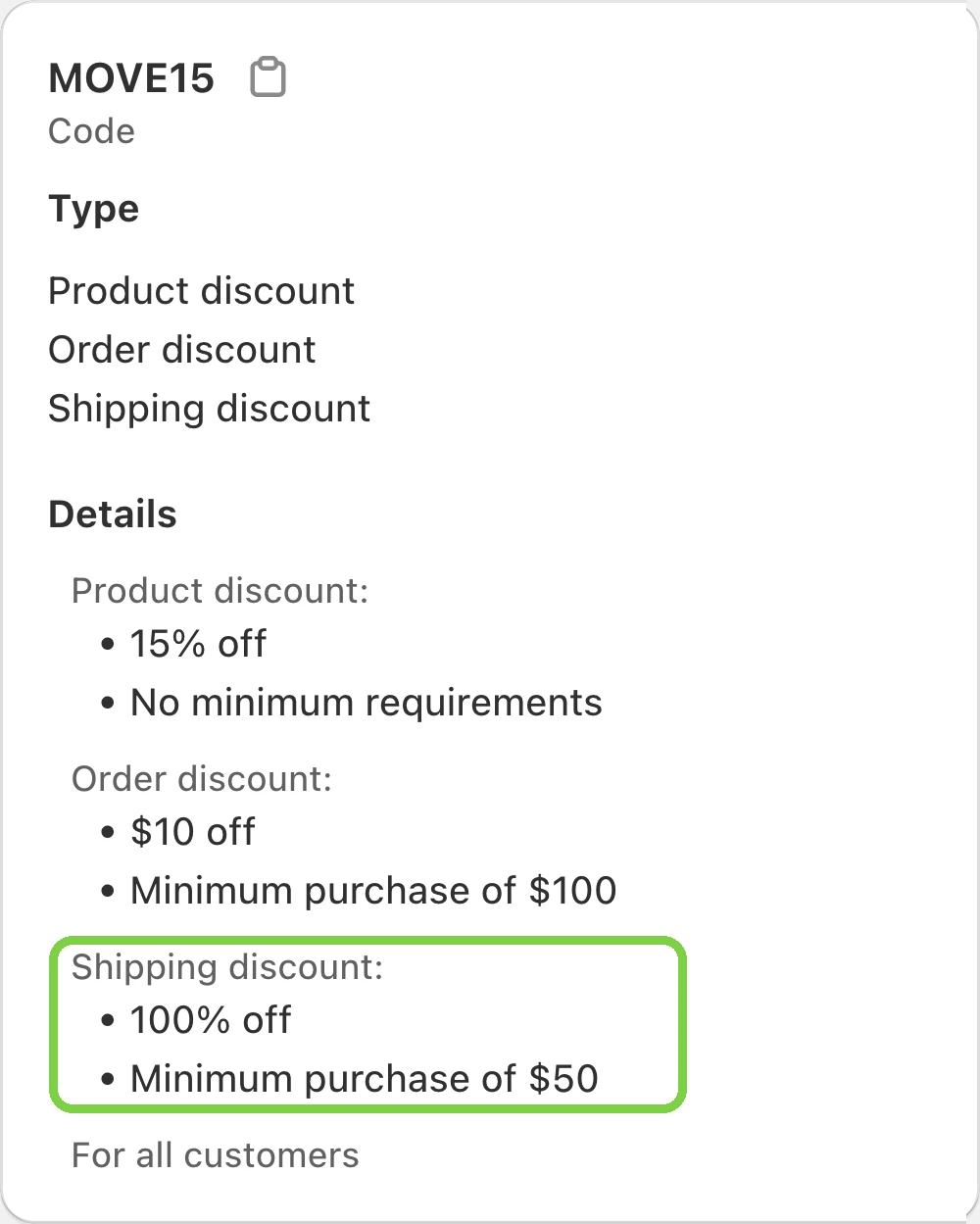
Under the code, the summary card also has a Share link, such as yourstore.com/discount/MOVE15, that applies the code for the shopper. Pick where it lands under Link destination.
What does a shopper get from one code on different carts?
The shop sells the Cork Yoga Mat at $68, the bands at $24, an Insulated Water Bottle at $32 and Electrolyte Sachets at $22. Three shoppers type MOVE15.
One code, three carts: MOVE15
Under $100: no $10 off
All three parts apply
Free shipping only
The first gets 15% off the mat and free shipping, but no $10 off: her cart is under $100. The second saves $23.80 plus shipping. The third buys neither product on offer and stays under $100, yet still gets free shipping, because the shipping part follows its own minimum.
What should you check before you share the code?
- Test it before the start date. A scheduled code doesn’t work yet, so click Duplicate on the campaign, give the copy a code only you know, set its start to today and activate it. Try one cart per part, check the lines at checkout, and stop before paying. Then deactivate and delete the copy, since it counts toward your plan’s campaigns.
- Test the $100 line. Shopify’s own order discounts need the cart at or over the minimum after product discounts too. Try a cart that drops under $100 after the 15%, such as the mat and the bottle: $100 before the 15%, $89.80 after. Write the email to match what you see, minimums included: a $40 cart of other products gets nothing from MOVE15.
- Free shipping already automatic in your store. Only one shipping discount applies per order, so the code’s shipping part can’t combine with yours. Shopify then puts product and order discounts first, and a shopper using MOVE15 could lose your free shipping. Turn off the code’s Shipping discount card, tick Shipping discounts in its Combinations, and let your free shipping combine with product and order discounts. Then test a cart under $50.
- Products already on sale. A sale that changes the price, like a Bulk price editor sale, isn’t a discount, so Combinations can’t stop the 15% landing on top. Ticking For product already discounted, calculate the discount based on compare-at price in the Product discount card takes the 15% off the original price instead. An item already marked down by more than that gets nothing extra. Keeping codes off sale items shows other fixes.
- You can’t change a live code’s discounts. Deactivate it, edit it, set the end date again, Save, then Activate. A campaign activated again has no end date unless you set one. The code doesn’t work in between.
How to undo it
- Shopify discounts: open each one under Discounts and click Deactivate.
- A Discounty Advanced discount code: click Deactivate. The campaign shows Reverting while the discount is removed, then Expired, and the code stops working. Campaign statuses in Discounty explains each status.
 Shopify Discount Combinations: How to Stack or Stop Them
 Automatic Discounts on Shopify: How to Set One Up
 How to Offer Free Shipping Over a Cart Amount on Shopify, With a Progress Bar