


How do Discounty campaigns combine with each other, Shopify discounts, and third-party app discounts?
How each Discounty campaign type combines with other Discounty campaigns, Shopify discounts and app discounts, plus same-line stacking.
When a customer qualifies for more than one discount, you'll want to know which ones apply and which are ignored. That decides whether a promo code works on items that are already on sale, or whether two campaigns discount the same product twice. Below, for each Discounty campaign type, you'll find how it's applied, which combination settings it has, and what happens at checkout when it meets another Discounty campaign, a Shopify discount (code or automatic) or a third-party app discount.
How Shopify combines discounts
Discounty creates and manages your campaigns, but Shopify decides how discounts combine in the cart and at checkout. The rules below come from Shopify and apply to every discount in your store, whichever app created it.
Three discount classes. Every discount belongs to a class: a product discount (applies to specific items), an order discount (applies to the cart subtotal), or a shipping discount (reduces the shipping cost).
Combination is set per discount and must be allowed on both sides. Each discount has its own combination settings that list which classes it can combine with. Two discounts combine only when each one allows the other's class. If either side doesn't allow it, Shopify applies the best discount (or best combination of discounts) for the cart and ignores the rest.
What can combine. Product discounts combine with order discounts and shipping discounts. Order discounts combine with shipping discounts. Product discounts combine with other product discounts on different items. Two shipping discounts never combine.
Order of calculation. Product discounts are applied to the items first, then order discounts to the subtotal, and shipping discounts last.
One product discount per item. By default, an item that qualifies for two product discounts gets only the better one. Applying two product discounts to the same item needs Shopify Plus. See the same-line stacking section below.
Limits. A customer can use at most 5 product or order discount codes and 1 shipping discount code on the same order. A store can have at most 25 active automatic discounts, and automatic discounts from apps count toward that limit.
Third-party apps. Discounts from other apps follow the same rules, as long as the app supports Shopify's discount combinations. If an app doesn't, its discounts won't combine with yours.
Quick reference: how each Discounty campaign type combines
Discounty campaign | How it is applied | Combination settings in the campaign form | With other Discounty campaigns | With Shopify and third-party app discounts |
|---|---|---|---|---|
Bulk price editor | Changes the product's price and compare-at price (not a Shopify discount) | Campaign combinations: other Bulk price editor campaigns, and Quantity discount and Cart goal campaigns | Only what you tick in Campaign combinations. Otherwise a product stays in the first campaign only. | Always. Any code or automatic discount is applied on top of the reduced price. |
Quantity discount / Cart goal | Automatic product discount (Shopify Function) | Campaign combinations: Bulk price editor campaigns; Allow stacking on the exact same product(s) | Bulk price editor through Campaign combinations. Buy X get Y and Advanced discount code on the same item only with same-line stacking. | Combines with product, order and shipping discounts by default. Contact support to change this. |
Buy X get Y | Automatic product discount (Shopify Function) | Campaign combinations: With other Shopify's product / order / shipping discounts; Allow stacking on the exact same product(s) | Follows the same three checkboxes. Same item only with same-line stacking. | Whatever you tick, as long as the other discount also allows product discounts |
Advanced discount code | Discount code with product, order and/or shipping discounts (Shopify Function) | Combinations: Product discounts / Order discounts / Shipping discounts; Allow stacking on the exact same product(s) | Follows the same three checkboxes. Same item only with same-line stacking. | Whatever you tick, as long as the other discount allows every class the code contains |
Shipping discount | Shipping discount, as a code or an automatic discount (Shopify Function) | Combinations: Product discounts / Order discounts | Product and order campaigns if ticked. Never another shipping discount. | Product and order discounts if ticked. Never another shipping discount. |
Bulk price editor campaigns
A Bulk price editor campaign doesn't create a discount in Shopify. It changes the product's price and sets the previous price as the compare-at price, so the sale price is what every channel, discount and app sees as the item's price.
With Shopify and third-party app discounts
Because the reduction is already in the price, every other discount is applied on top of it. No setting in Discounty prevents this. For example, if a Bulk price editor campaign takes 20% off a $100 product (now $80) and a customer uses a 10% discount code, the code takes $8 off and the customer pays $72.
If you don't want a Shopify discount code to apply to products already on sale through a Bulk price editor campaign, limit the code in Shopify to products or collections that leave those items out.
With other Discounty campaigns
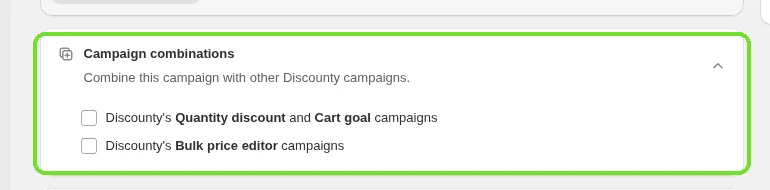
In the Campaign combinations card of the campaign form, you can tick Discounty's Bulk price editor campaigns and Discounty's Quantity discount and Cart goal campaigns. Combining Discounty campaigns is included on the Discounty plan and above.
Both campaigns must allow each other. For a Bulk price editor campaign to combine with a Quantity discount campaign, tick Discounty's Quantity discount and Cart goal campaigns here, and tick Discounty's Bulk price editor campaigns in the Quantity discount campaign. If either side doesn't allow it, Discounty leaves the shared products out of the newer campaign so they aren't discounted twice.
Depending on when you installed Discounty, the card may show only the option for Quantity discount and Cart goal campaigns, not the option for other Bulk price editor campaigns.
When two Bulk price editor campaigns allow combining, the second discount is calculated on the price the first campaign already set. For example, 20% off and then 10% off a $100 product gives $72, not $70.
The Bulk price editor option isn't available when the discount type is New price, or when the campaign keeps the current price and sets a higher compare-at price. In that case the form shows "The campaign can't be combined with "Price rule" when the discount is set to 'new price'".
Buy X get Y, Advanced discount code and Shipping discount campaigns aren't part of this card. They combine with a Bulk price editor campaign the same way any Shopify discount does: on top of the reduced price.
Quantity discount and Cart goal campaigns
Quantity discount and Cart goal campaigns are applied as an automatic product discount that Discounty creates in Shopify. The campaign form has no checkboxes for Shopify's product, order and shipping classes, because by default these campaigns share one automatic discount in your store. A campaign that uses customer segments or same-line stacking gets its own automatic discount, which counts toward Shopify's limit of 25 active automatic discounts.
With Shopify and third-party app discounts
By default, this automatic discount combines with product discounts, order discounts and shipping discounts. A Shopify discount code or another app's discount combines with your Quantity discount or Cart goal as long as that other discount also allows product discounts. If you want Quantity discount and Cart goal campaigns to stop combining with one or more classes, contact our support team and we'll change the setting for your store.
With other Discounty campaigns
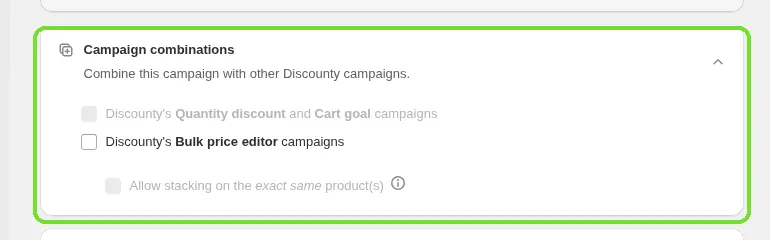
Bulk price editor: tick Discounty's Bulk price editor campaigns in the Campaign combinations card, and make sure the Bulk price editor campaign has Discounty's Quantity discount and Cart goal campaigns ticked too. The tier discount is then applied on top of the reduced price. If either side doesn't allow it, products already in the Bulk price editor campaign are left out of the newer campaign. Combining Discounty campaigns is included on the Discounty plan and above.
Another Quantity discount or Cart goal campaign: two of these campaigns can't discount the same product. The product stays in the campaign it was added to first.
Buy X get Y and Advanced discount code: these are product discounts too, so on the same item Shopify keeps only the better one unless you turn on same-line stacking (see below). On different items they apply together.
Example: a "Buy 3, get 10% off" Quantity discount campaign and a Shopify automatic order discount of $5 on orders over $50. A customer buys 3 shirts at $20 each. The Quantity discount takes 10% off the items ($54), then the order discount takes $5 off the subtotal, so the customer pays $49 plus shipping.
Buy X get Y campaigns
Buy X get Y campaigns are applied as an automatic product discount that Discounty creates in Shopify. The discount applies to the reward (Y) items only. The qualifying (X) items keep any other discounts they're eligible for. Each Buy X get Y campaign adds one automatic discount, which counts toward Shopify's limit of 25 active automatic discounts.
Combination settings
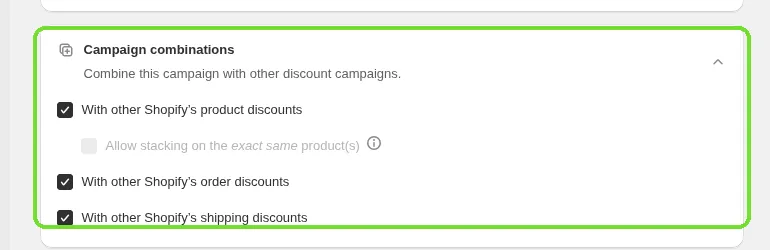
Open the Campaign combinations card in the campaign form and tick any of With other Shopify's product discounts, With other Shopify's order discounts and With other Shopify's shipping discounts. All three are ticked by default. These settings cover every other discount in the store: other Discounty campaigns, discounts created in Shopify, and third-party app discounts.
Another discount combines with the reward only if that discount also allows product discounts.
If the reward item also qualifies for another product discount, Shopify applies only the better of the two to that item. To apply both, turn on same-line stacking (see below).
Using the same X products in more than one Buy X get Y campaign can cause overlapping rewards. The form warns you with "Some of the X products in this campaign are already used as X in another Buy X Get Y campaign. This may cause overlapping discounts."
Example: your whole store has a 10% automatic discount, and a Buy X get Y campaign gives 50% off a reward item. The X items get the 10% discount. The reward item gets 50% off, because that's the better product discount for that item, and it doesn't also get the 10%. If the campaign allows order discounts and the customer's order code allows product discounts, the order code is applied on top.
Advanced discount code campaigns
An Advanced discount code is one discount code that can contain a Product discount, an Order discount and a Shipping discount, in any combination. Discounty registers the code in Shopify with the classes you turned on, so a code with all three is a product, order and shipping discount at the same time.
Combination settings
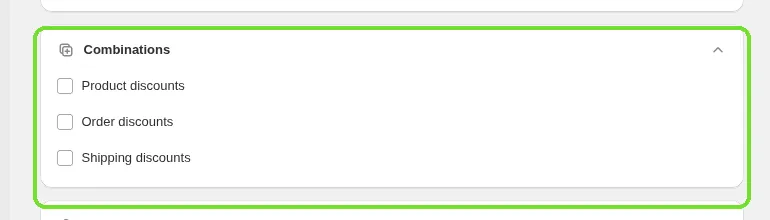
Open the Combinations card in the campaign form and tick any of Product discounts, Order discounts and Shipping discounts. These settings cover other Discounty campaigns, discounts created in Shopify, and third-party app discounts. The Shipping discounts option is only available when the code contains an order discount or a product discount, because a shipping discount can never combine with another shipping discount.
Because the code can carry several classes, another discount combines with it only if that discount allows every class the code contains. For example, a code with a product discount and a shipping discount combines with a Shopify automatic order discount only if that automatic discount allows both product discounts and shipping discounts.
At checkout, Shopify allows up to 5 product or order codes and 1 shipping code. An Advanced discount code that contains a shipping discount uses the shipping code slot.
If the code's product discount and another product discount apply to the same item, Shopify keeps the better one unless same-line stacking is on.
Example: code SUMMER gives 15% off a collection and free shipping, with Product discounts and Order discounts ticked. A Buy X get Y campaign that allows product and shipping discounts runs on a different product. A customer who has both products and enters SUMMER gets 15% off the collection item, the Buy X get Y reward on the other item, and free shipping.
Shipping discount campaigns
A Shipping discount campaign is applied as a shipping discount, either as a discount code or as an automatic discount, depending on the Discount method you choose. Automatic shipping discounts count toward Shopify's limit of 25 active automatic discounts.
Combination settings
Open the Combinations card and tick Product discounts and/or Order discounts. Both are unticked on a new campaign. When ticked, the shipping discount applies together with Discounty product campaigns (Quantity discount, Cart goal, Buy X get Y, and the product part of an Advanced discount code), Shopify product and order discounts, and third-party app discounts, as long as those discounts allow shipping discounts too.
Two shipping discounts never apply to the same order. If a customer has a Shopify free-shipping code and an automatic Discounty shipping discount, Shopify applies the better one.
Bulk price editor campaigns always work with a shipping discount, because they change the price instead of adding a discount.
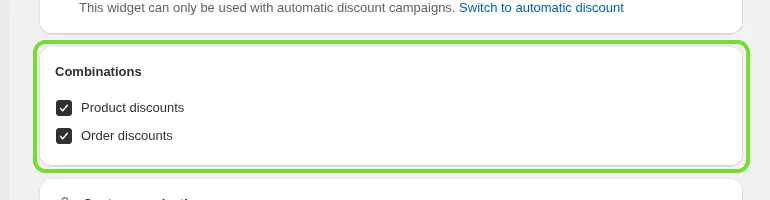
Example: a Discounty automatic free-shipping campaign with Product discounts and Order discounts ticked, plus a Shopify code WELCOME10 (10% off the order) that allows shipping discounts. The customer enters WELCOME10 and gets 10% off and free shipping.
Stacking two product discounts on the same item
By default, Shopify applies only the best product discount to an item, even if the item qualifies for two of your campaigns. Buy X get Y, Advanced discount code, Quantity discount and Cart goal campaigns have an Allow stacking on the exact same product(s) option in their combinations card. It lets two Discounty product discounts reduce the same item together. On Buy X get Y it appears under With other Shopify's product discounts, on Advanced discount code under Product discounts, and on Quantity discount and Cart goal under the Bulk price editor option of the Campaign combinations card.
Same-line stacking needs Shopify Plus and the Discounty plan or above (listed on the Plans page as "Stack discounts on the same product (Shopify Plus)"). Quantity discount and Cart goal campaigns can't stack with each other. For the setup steps, the pairing rules and the automatic-discount slot it uses, see How do I stack two product discounts on the same item?
When discounts don't combine as expected
Check the combination settings on both discounts. Each discount must allow the other one's class.
Check the classes. Two order discounts or two shipping discounts never combine, and two product discounts on the same item need same-line stacking.
Check that both campaigns are Active. Discounty only registers a discount in Shopify while its campaign is running.
For a third-party app discount, ask the app's developer whether it supports Shopify's discount combinations.
For Quantity discount and Cart goal campaigns that don't apply at all, see the troubleshooting guide linked below.
Related articles
Need a hand? Contact our support team through the app — we're happy to help.