


Six Questions to Ask Lumos Before Black Friday
Paste six questions into Lumos the week before the sale. It checks your own campaigns and tells you what to fix while there is still time.

Your Black Friday campaigns are built. The week before the sale, the question is whether they will behave on 27 November, and Lumos, the AI assistant inside Discounty, checks that for you from your own campaigns, usually in under half a minute per question.
Click Ask Lumos in the header of any Discounty page and paste these six questions, one per conversation:
- Will shoppers actually see my discounts on my store right now?
- Black Friday is on 27 November. Which of my campaigns will be running that weekend, and exactly when does each one start and end in my store’s time?
- Before Black Friday: do any of my campaigns overlap on the same products, so a shopper could get two discounts on one item?
- Which of my products are not in any active campaign right now?
- If I run a Bulk price editor sale for Black Friday, will my prices go back to normal on their own when it ends?
- How did my campaigns perform over the last 30 days?
Lumos tells you whether shoppers can see your discounts
Ask the first question and Lumos checks Discounty’s app embed in your live theme. The embed is a separate switch in your Shopify theme, so every widget can look switched on inside Discounty while the embed is off. When it is off, your discounts still apply at checkout, but the quantity table on product pages, the cart savings widget and the countdown timers don’t appear, so shoppers miss the prompts that make them add more. Lumos says so in its first line and gives you two ways to fix it.
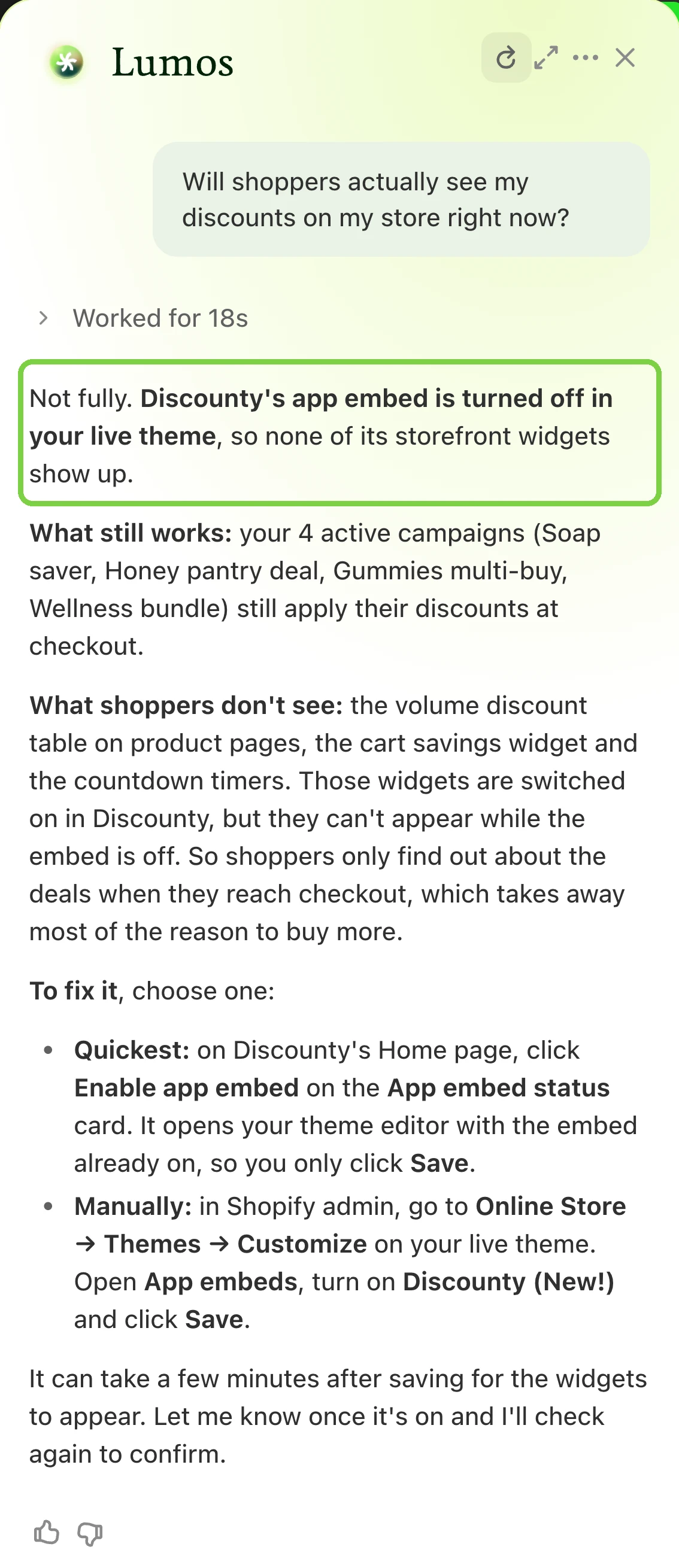
The quick fix: on Discounty’s Home page, the App embed status card has an Enable app embed button that opens the theme editor with the embed already on, so you only click Save. The manual one: in Shopify admin, Online Store → Themes → Customize, then App embeds, turn on Discounty and save. Widgets can take a few minutes to appear. The full steps are in How to activate Discounty widgets. Then open one sale product on your phone, signed out, and see the widgets for yourself.
See every campaign running over Black Friday weekend
Lumos lists each campaign that will be live that weekend, with its start and its end, including any that say No end date.
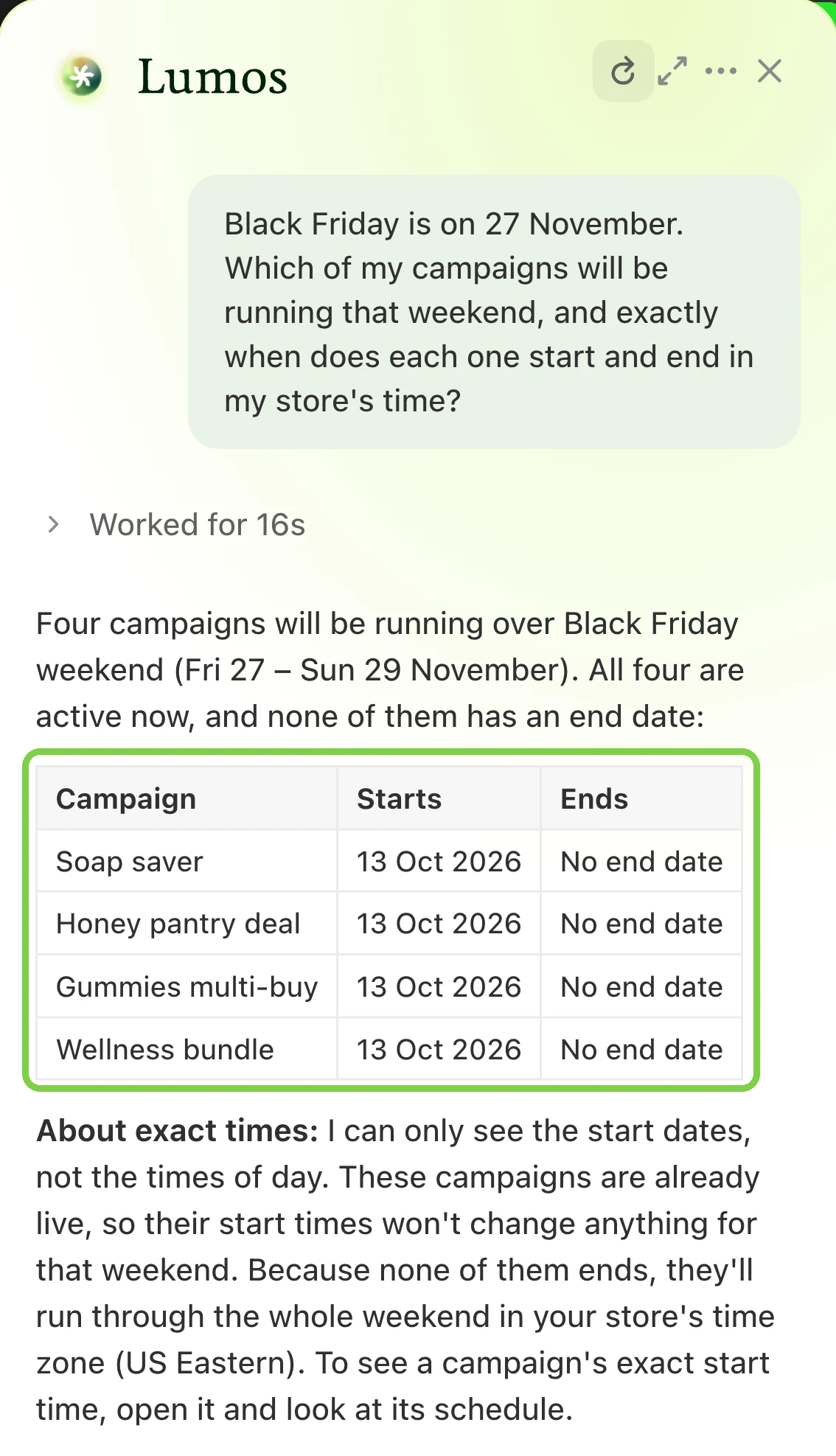
That end-date column is worth a careful look. When a Bulk price editor, Quantity discount or Cart goal campaign is activated, Discounty skips any product that another active campaign already discounts, and the campaign that went live first keeps it. The app warns you when it happens: “Some products in this campaign are already discounted by another active campaign, so they won’t receive this discount.” So an older campaign with no end date can hold on to products your Black Friday sale was meant to cover.
Go down the list and decide for each campaign. If it should give way to the Black Friday sale, deactivate it before the sale goes live, or give it an end date the day before. If shoppers should get both discounts, combining campaigns is on the Discounty plan and up, and some pairs can’t combine. The rules are in How Discounty campaigns combine. For the exact minute a sale opens, read the campaign’s Schedule card.
Check that two discounts won’t land on one product
Lumos answers yes or no, then shows its working: which products each campaign covers and how its Combines with settings are set.
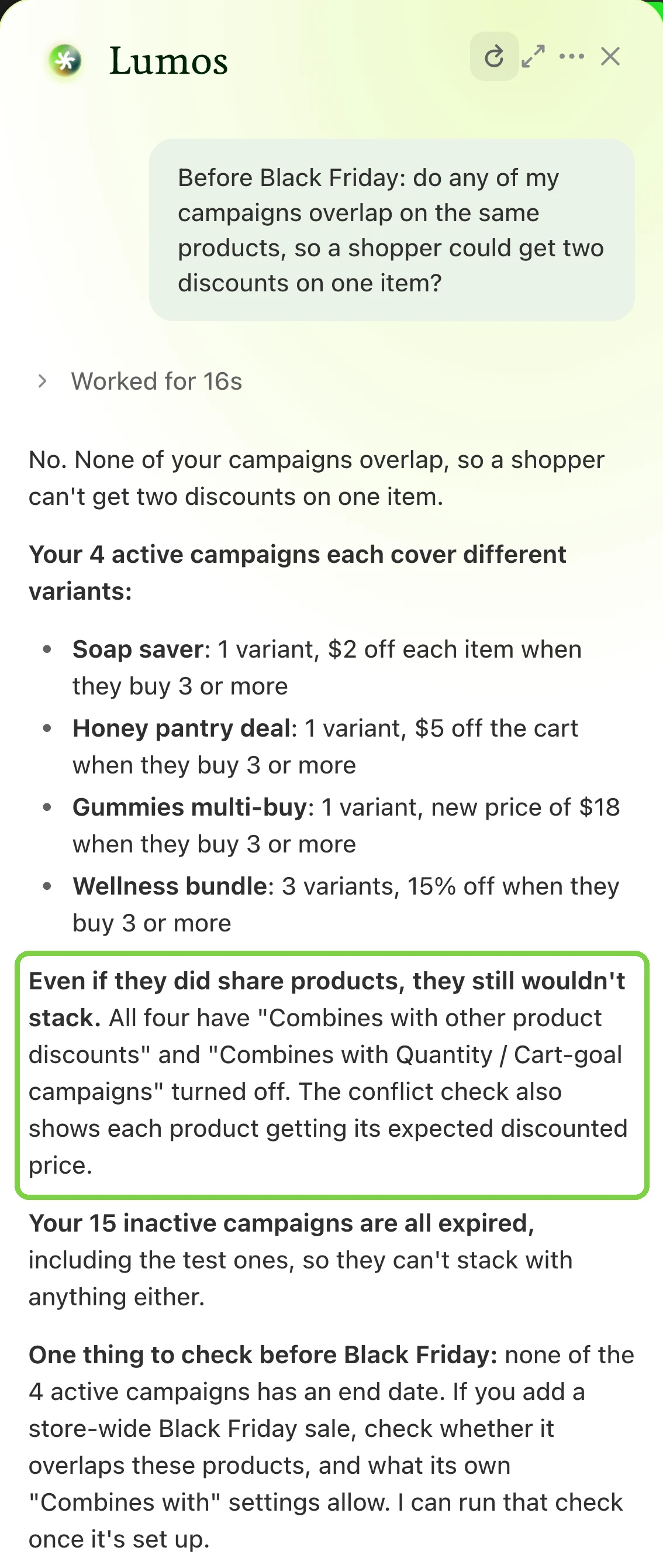
Lumos offers to run the check again once your store-wide Black Friday sale exists. Take it up on that, on the day you save the sale. Whether stacking is a good idea at all is covered in Shopify discount combinations.
Find the products left out of the sale
Lumos names the products in an active campaign and the ones left out, and tells you why the gap exists, such as campaigns that name products one by one instead of covering a collection.
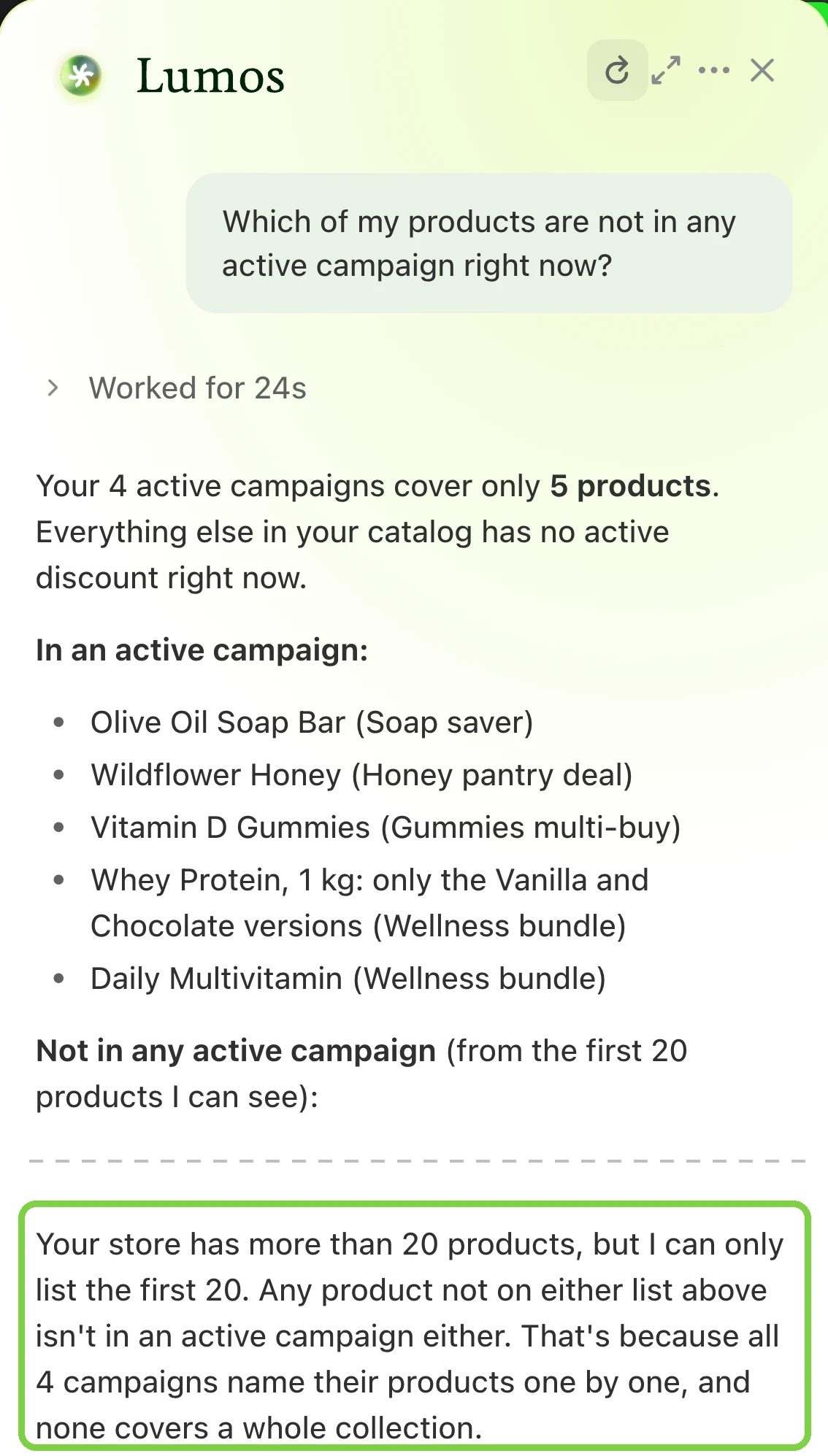
For Black Friday, pick products by collection, tag or product type where you can. A campaign’s product list is fixed when you activate it. With Auto-update on, products you add later that match the filter join by themselves, usually within about two hours. Auto-update is on the Discounty plan and up. On other plans, deactivate and reactivate the campaign after adding products, and set the end date again when you do.
Confirm prices come back after the sale
Ask about a Bulk price editor sale, the campaign type that changes prices in Shopify, and Lumos answers: “Yes, as long as you set an End date.” When the end time passes, the campaign shows Reverting while Discounty puts the original prices back, then Expired. Markets and B2B catalog prices changed by the campaign come back too. End dates are on every plan, including the free one; Campaign statuses in Discounty explains each status.
The Tuesday after: ask how it went
Ask “How did my campaigns perform over the last 30 days?” Lumos reads your store’s orders and tells you what came in over that period. If nothing did, it says so and suggests what to check, such as a password page, the traffic report in Shopify Analytics, or a test order with a qualifying cart.
Good to know
- Type times in your store’s clock. Lumos answers in your store’s time zone, while the campaign form reads the times you type in your device’s time zone. If you work from another time zone than your store, convert before you type, or save from a device on store time.
- On a large catalog, check the count too. Lumos looks at the first 20 products it can see, so on a bigger store compare the product count in the campaign form with the collection in Shopify.
- You stay in control. Each answer can end with an offer, such as setting up a Black Friday campaign for 27 to 30 November. Accepting opens a filled-in form, and nothing exists until you click Save. Activating, deactivating or deleting a campaign always goes through Discounty’s own confirmation dialog.
Lumos is on every plan and works when Discounty is opened from your Shopify admin; How do I use Lumos has the details. Add the six questions to the “one week out” step of the Black Friday checklist, and read what goes wrong at Black Friday for the failures they are meant to catch.
 What Goes Wrong at Black Friday, and How to Catch It Early
 Black Friday Checklist: 14 Steps in the Order They Happen
 How to Schedule a Shopify Sale That Starts and Ends by Itself